Know Where Every Laptop Is, and Who's Holding It
Your company's register for laptops, phones, vehicles and anything else you hand out. Track what shape each item is in, assign and return with a click, let employees request what they need, and see it all come back at offboarding.
- No credit card
- Quick set up
- Free onboarding
What is HR asset management software?
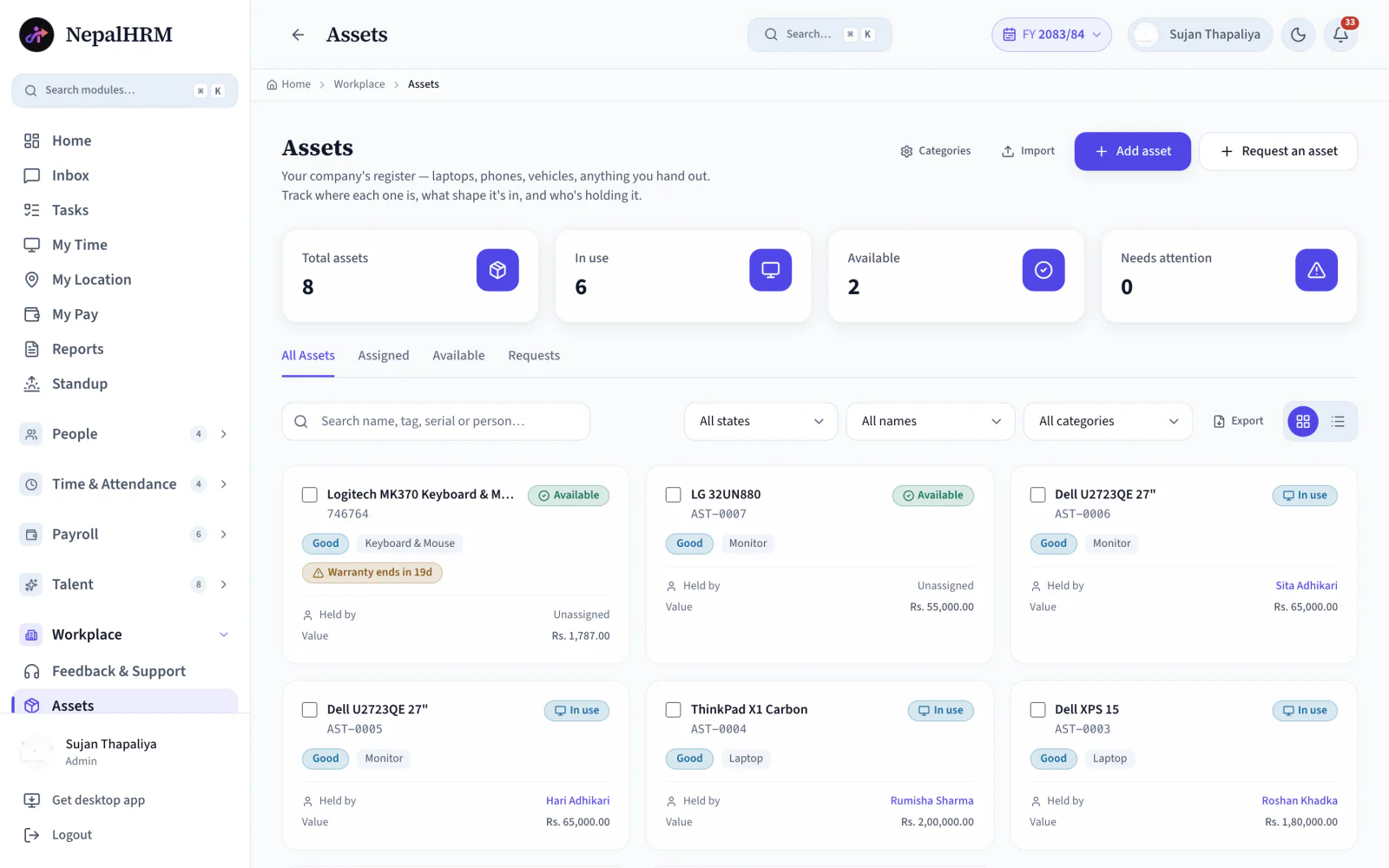
Asset management software keeps a company's issued equipment on a register instead of in somebody's memory. NepalHRM tracks each item with its own tracking ID, serial number, condition and cost, and records who is holding it right now. Assigning, returning or requesting an item is a single action that changes the item's status with it, which is what stops the register and the real world from drifting apart over a year.
- Two kinds of item are supported: serial-tracked assets, and bulk stock counted by quantity.
- An existing asset register imports by CSV rather than being retyped row by row.
- Live counts sit above the list: total assets, in use, available, and needs attention.
- Employee asset requests arrive in their own tab instead of in a chat thread somebody has to remember.
- Every assignment and return is recorded against the employee, so an exit clearance can be checked against the register.
Last updated · Reviewed by Rajendra Regmi, Co-founder
From asset register to return, every item stays accounted for
- 2 Types
- Serial-tracked items or bulk stock
- CSV
- Bulk import your whole asset register
- 1 Click
- Assign, return or request an asset
- Live Counts
- In use, available or needs attention
The Register Is an Excel File Nobody Trusts
Assets bought over the years, handed out informally, tracked in a sheet that was last updated two office moves ago.
- Nobody knows how many laptops the company owns, or where they are
- Handovers happen verbally, so returns are nobody's job
- Requests for a monitor or a SIM card travel by chat and get lost
- Purchase costs and conditions unknown, so budgeting is guesswork
One Register, Every Item, Every Holder
Each asset carries its tracking ID, serial number, condition and cost. Assignments change status automatically, and requests arrive in a tab rather than a chat.
What NepalHRM gives you
- Live counts up top: total assets, in use, available, needs attention
- Serial-tracked unique items and bulk stock (cables, chairs, SIM cards) in the same register
- Assign to an employee and the status flips to In Use; return it and it is Available again
- Employees request assets by category with a reason, and HR responds in the Requests tab
Everything From Purchase to Return in One Module
A complete asset lifecycle: catalogued with cost and condition, assigned with a click, requested with a reason, and returned before the exit completes.
The Asset Register
Laptops, phones, vehicles, furniture and other company property in one searchable register.
Live Status Counts
Total assets, In Use, Available and Needs Attention, always current at the top of the page.
Categories
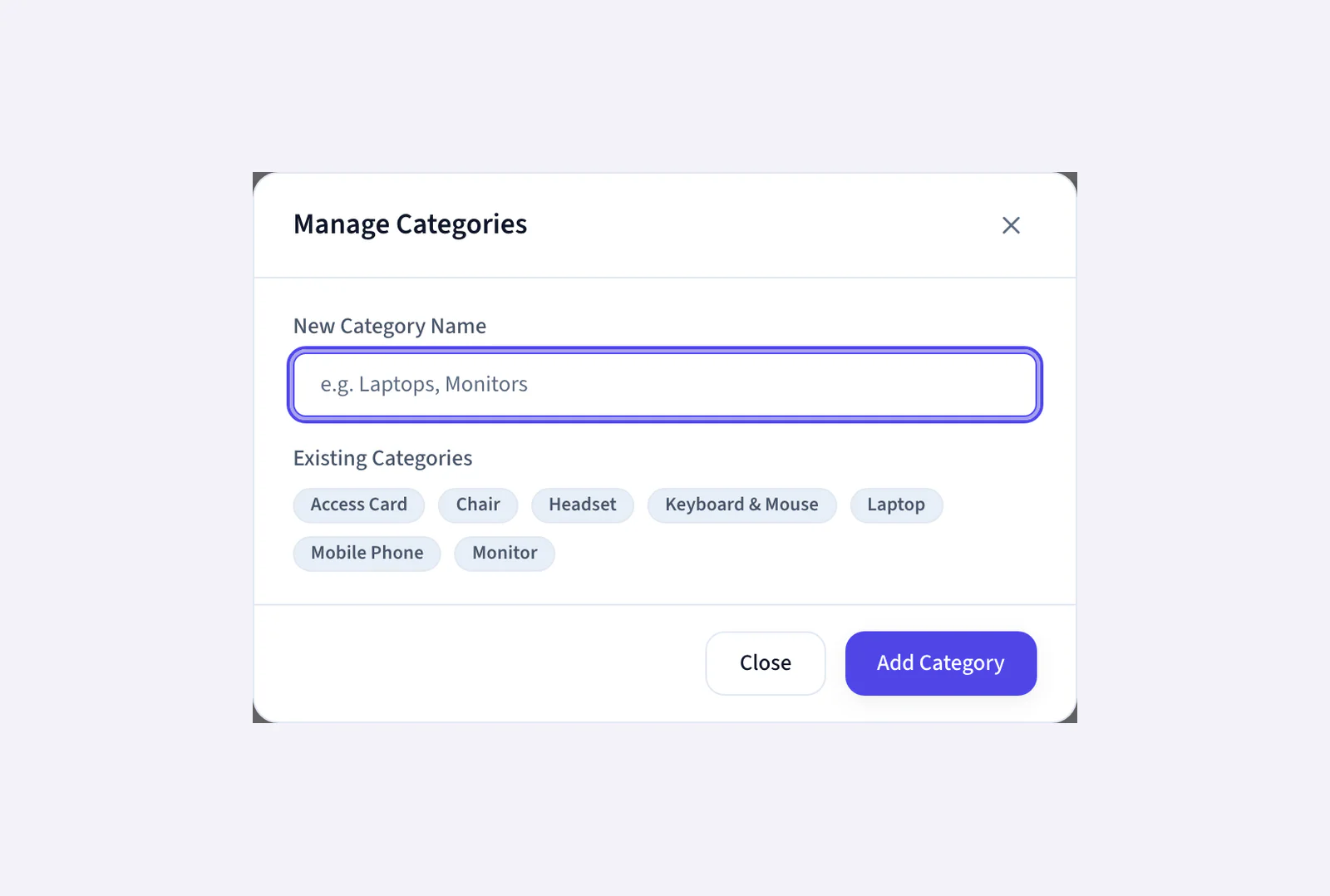
Create categories that match your business: laptops, phones, vehicles, furniture, SIM cards or tools.
Tracking IDs & Serials
Internal tracking IDs for stickers and handover forms, plus the manufacturer's serial number.
Unique Items or Bulk Stock
Serial-tracked unique items and quantity-based bulk stock (cables, chairs, SIMs) live in one register.
Cost & Condition
Record purchase dates, costs and current condition, from new and sealed to damaged or needing repair.
One-Click Assign
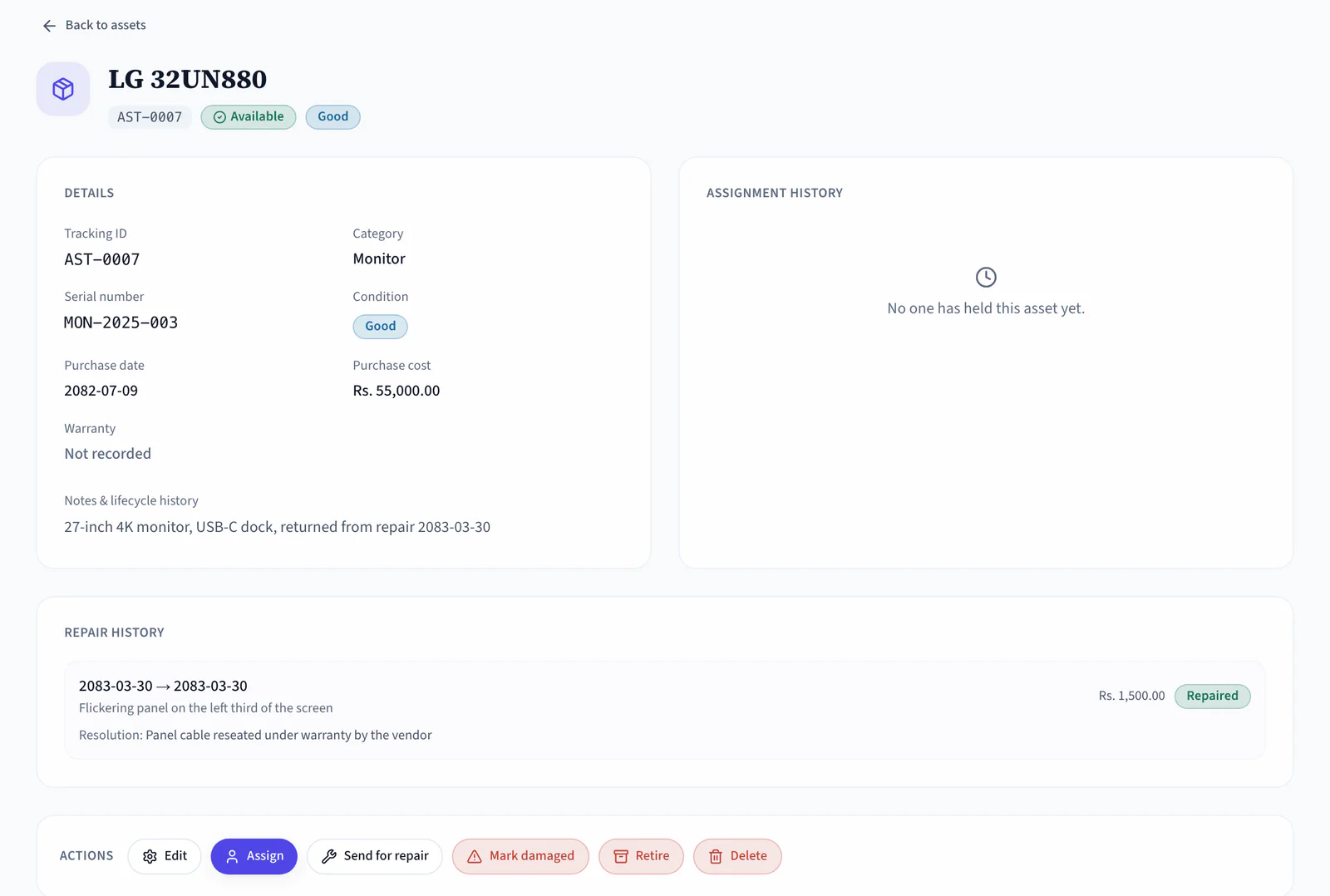
Open an asset, choose Assign and pick the employee. Status changes from Available to In Use automatically.
One-Click Return
Open the asset's assignment history and select Return. The item becomes Available again while the full record stays saved.
Asset Requests
Employees pick a category and add a reason. The request lands in HR's Requests tab, not a chat thread.
CSV Import & Export
Bring your existing register in with the Import button, and export the current state anytime.
Search & Filters
Search by asset name, tracking ID, serial number or employee. Filter by status and switch between grid and list views.
Offboarding Handshake
Assigned assets show on each employee's profile, and IT Asset Return is a formal offboarding stage.
Every Item Moves Through Four Clear States
From the day it is purchased to the day it is handed back, the register always knows what state each asset is in.
- Available
Catalogued
Added with name, tracking ID, category, serial, condition and cost, or imported by CSV.
- In use
Assigned
Handed to an employee with one click. The holder shows on the asset and on their profile.
- Needs attention
Flagged
Condition tracked over its life, so repairs and replacements surface before things fail.
- Available again
Returned
Returned at handover or offboarding clearance, back in the pool with its history intact.
Set Up in an Afternoon, Manage It in Seconds Each Day
Build the register once, then run assignments and requests from it every day. Fully auditable. Zero spreadsheets.
- From the toolbar, add Laptop, Phone, Vehicle, Furniture, or whatever your company actually hands out.
- With + Add Asset, pick Unique item (serial-tracked) or Bulk / stock (quantity). Only the name is required.
- Tracking ID for stickers and handover forms, serial number, condition, purchase date and cost.
- Bring your existing register in via CSV with the Import button, then correct anything in place.
- Click the asset, click Assign, pick the employee, confirm. Status flips from Available to In Use.
- Request an Asset takes a category and an optional reason, and lands in HR's Requests tab.
- Open the asset's Assignments section and click Return on the active row. It is Available again.
- Each leaver's assigned assets show on their profile, and IT Asset Return is a stage in offboarding clearance.
Name What You Hand Out
Available Becomes In Use
One Register, Clear Duties for Everyone
Employees ask, admin assigns, and finance finally knows what the company owns.
For Employees
Ask once, see it on your profile
- Request an asset by category, with your reason attached
- Everything currently assigned to you, visible on your profile
- Track the request status without chasing HR through chat
For HR & Admin
Hand out and take back, on the record
- Assign and return with one click; history stays on the asset
- Search by name, tag, serial or person, and filter by state
- Respond to asset requests from one tab, not five channels
For Finance
A register you can budget from
- Purchase date and cost on every item, exportable anytime
- Condition tracking shows what needs replacing before it fails
- Assets come back at offboarding, before final settlement
Asset Management Built for Every Business in Nepal
Ten laptops or a thousand: if the company hands it out, the register should know where it is.
The Asset Register Connects Every Module
An asset is attached to a person, and that person joins, gets paid and one day leaves. The register follows all three.
Onboarding & Offboarding
Day-1 laptops are handed out from the onboarding checklist, and IT Asset Return is a formal exit clearance stage.
Employee Management
Every item currently assigned shows on the employee profile, so the holder is never in doubt.
Helpdesk
A broken laptop becomes a ticket with an owner, and the asset's condition is updated when it is fixed.
Payroll Software
Outstanding items and dues are cleared before final settlement runs in that month's payroll.
Reports & Exports
Export the register with purchase dates and costs whenever finance or the auditor asks.
Mobile App
Employees raise asset requests and check what they hold from Android and iOS.
Asset & Procurement is one module of the all-in-one HR software for Nepal, so an employee is created once and every module above reads the same record.
Simple, Transparent Pricing
No Hidden Fees
NepalHRM gives you enterprise-grade HR software at a price built for Nepali businesses of every size.
- All core HR modules
- Nepal payroll compliance
- PF, SSF, CIT & eTDS
- Biometric integration
- Free onboarding support
- Regular feature updates
- Multi-company support
- BS + AD calendar
Free trial available, no card required · No setup fees · Cancel anytime
Access NepalHRM from the Web, Android and iOS
Assign equipment from your desk, review requests from your phone, and check current asset holders wherever you are.
Frequently Asked Questions
Everything you need to know about asset & procurement in NepalHRM before you get started.
Anything the company hands out: laptops, phones, vehicles, badges, furniture. Serial-tracked unique items and quantity-based bulk stock (cables, chairs, SIM cards) both live in the same register, under categories you define.
Use the Import option to bring your existing asset register into NepalHRM through CSV. You can include details such as tracking ID, category, serial number, condition and purchase cost, depending on the available import fields.
Click the asset, click Assign, pick the employee and confirm. The status changes from Available to In Use, and the asset appears on the employee's profile. Returns work the same way from the Assignments section.
Request an Asset asks for a category and an optional reason, such as “need a second monitor for design work”. The request lands in HR's Requests tab, and the employee can follow its status there.
Their assigned assets are visible on their profile, and IT Asset Return is a formal stage in offboarding clearance, so nothing walks out the door with the leaver.
Yes. You can add an asset with just a name and fill in tracking ID, serial, condition and cost later. Adding them up front skips the paperwork at handover time.
Stop Losing Track of What the Company Owns. Start Running One Register
Join hundreds of Nepali businesses that have already moved from manual HR to NepalHRM. Your team deserves better than Excel, and your assets deserve better than a forgotten sheet.
- No credit card
- Free onboarding
- Set up in one day
- Cancel anytime