An Employee Self Service Portal That Answers HR at 11pm
Payslips, leave balances, tax projections, attendance and expense claims, in the employee's own hands on web, Android and iOS. HR stops being the lookup service for questions the system can already answer.
- No credit card
- Quick set up
- Free onboarding
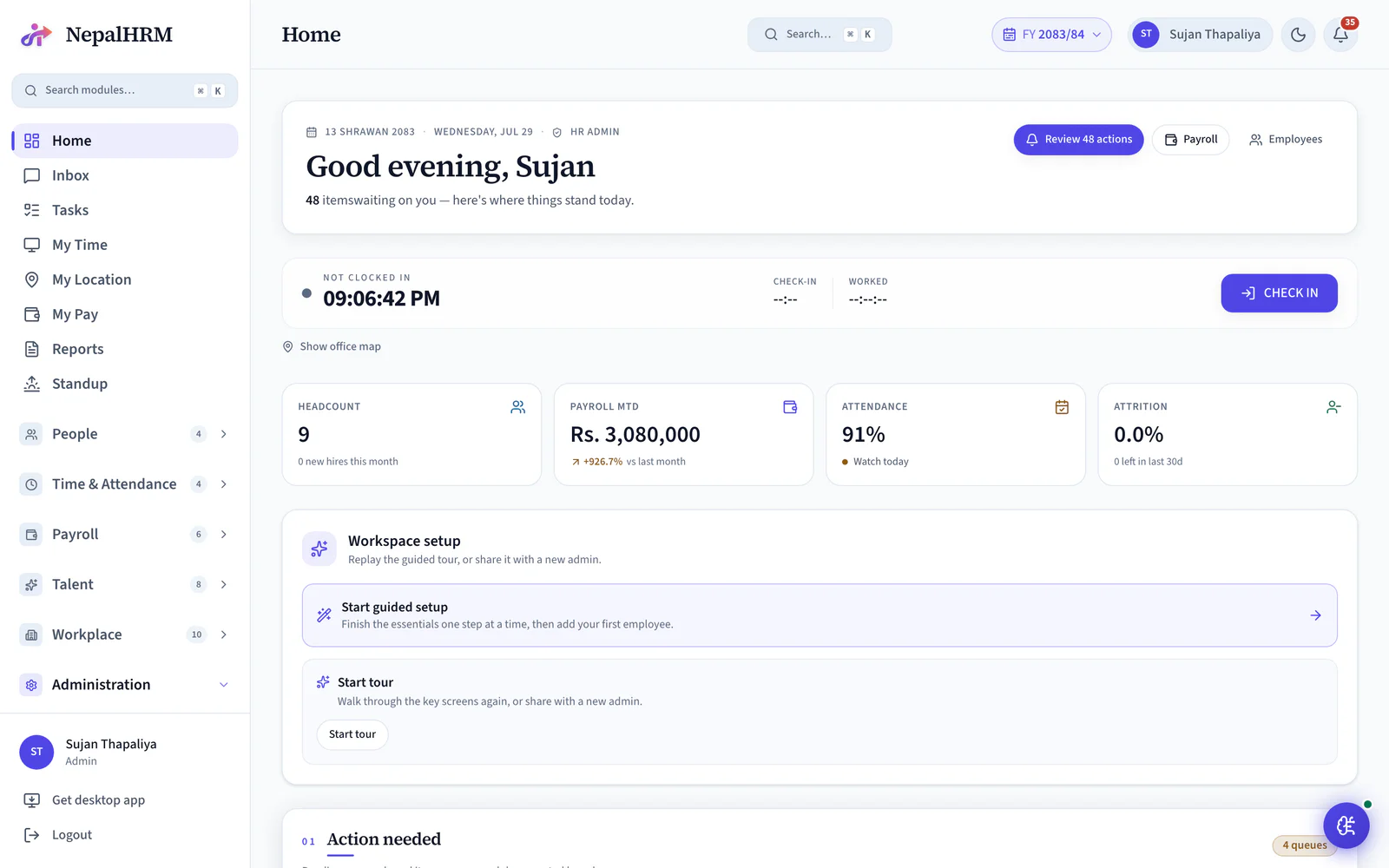
What is employee self service (ESS) in an HR system?
Employee self service is the part of an HR system employees operate themselves, without going through HR. In NepalHRM it is 17 screens covering payslips, leave balances and requests, attendance history, reimbursement claims, personal details and tax planning, on the web and on the Android and iOS apps. The four questions HR answers most often become four an employee can answer at whatever hour they think to ask.
- Full payslip history, one PDF per month, with the bank account masked to the last four digits.
- The tax planner tracks the Section 63 retirement contribution ceiling of NPR 500,000.
- Leave balances are live, so a request is made against a number the employee can already see.
- The same portal runs on the web and on the NepalHRM mobile app for Android and iOS.
- Reimbursement claims are raised, tracked and settled from the same portal as everything else.
Last updated · Reviewed by Rajendra Regmi, Co-founder
The four questions HR answers most, answered by the employee
- 23 Payslips
- Full history, each one a PDF
- 17 Screens
- Everything an employee can self-serve
- NPR 500,000
- Section 63 ceiling the planner tracks
- Web + Mobile
- Same portal on Android and iOS
HR's Day Goes To Questions the System Can Answer
A Nepali HR team of two supports two hundred people, and most of what reaches them is lookup, not judgement.
- “Send me my Shrawan payslip” arriving on Viber, one person at a time
- “How much leave do I have left?” asked again three days after it was answered
- Attendance disputes settled from memory because nobody can see their own punches
- Address and bank-account changes shouted across the office, then forgotten
The Employee Answers It Themselves
Every one of those is a screen the employee already has, on a phone, at whatever hour they remember to look.
What NepalHRM gives you
- Full payslip history with a PDF per month, bank account masked to the last four digits
- Leave balance, holiday calendar and an application form in the same place
- Own punch history and a regularization request when a punch is genuinely missing
- Profile changes submitted as a request, so HR approves instead of re-typing
Everything an Employee Asks For, Without Asking Anyone
Seventeen employee-facing screens, built so the answer arrives before the question reaches HR.
My Payslips
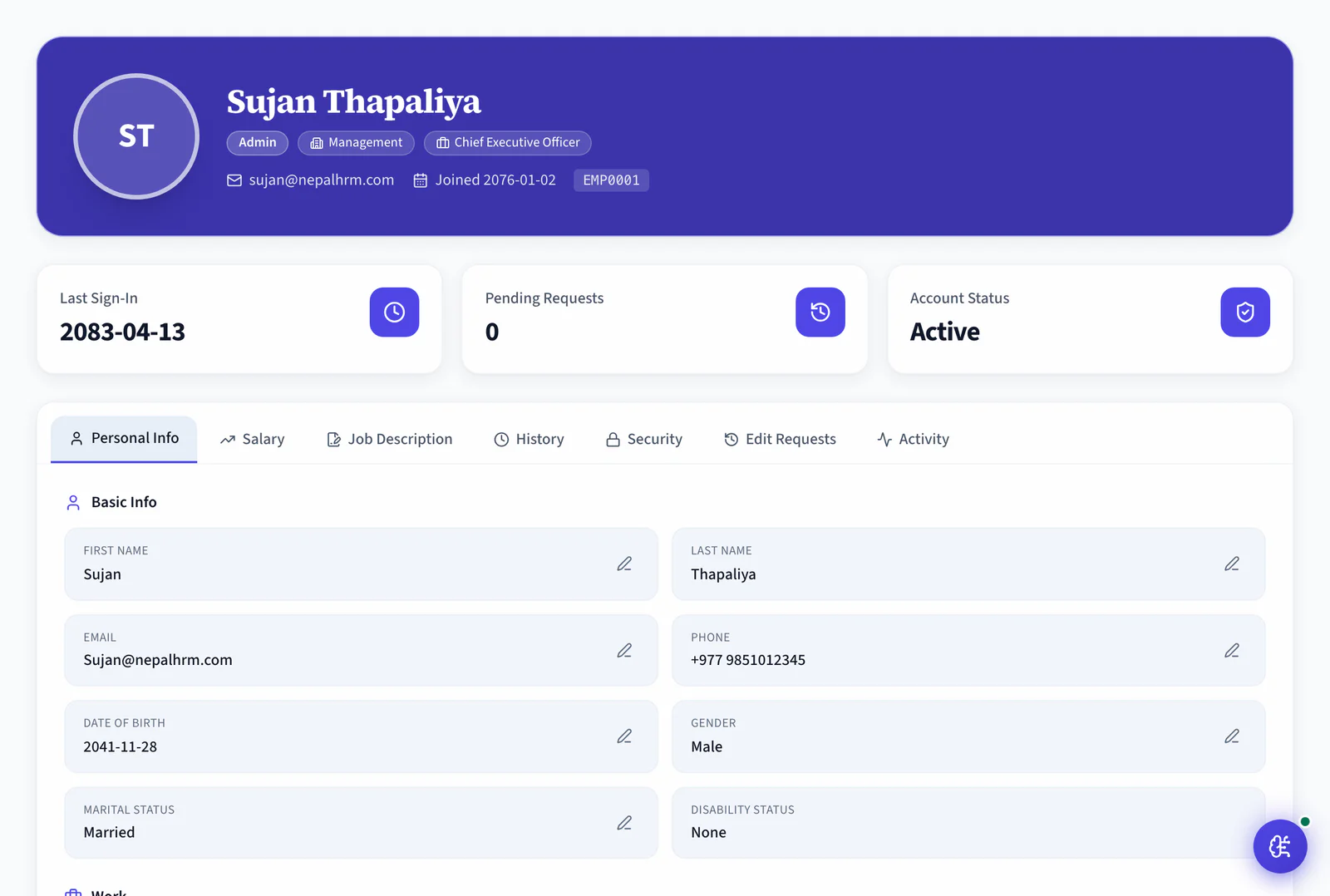
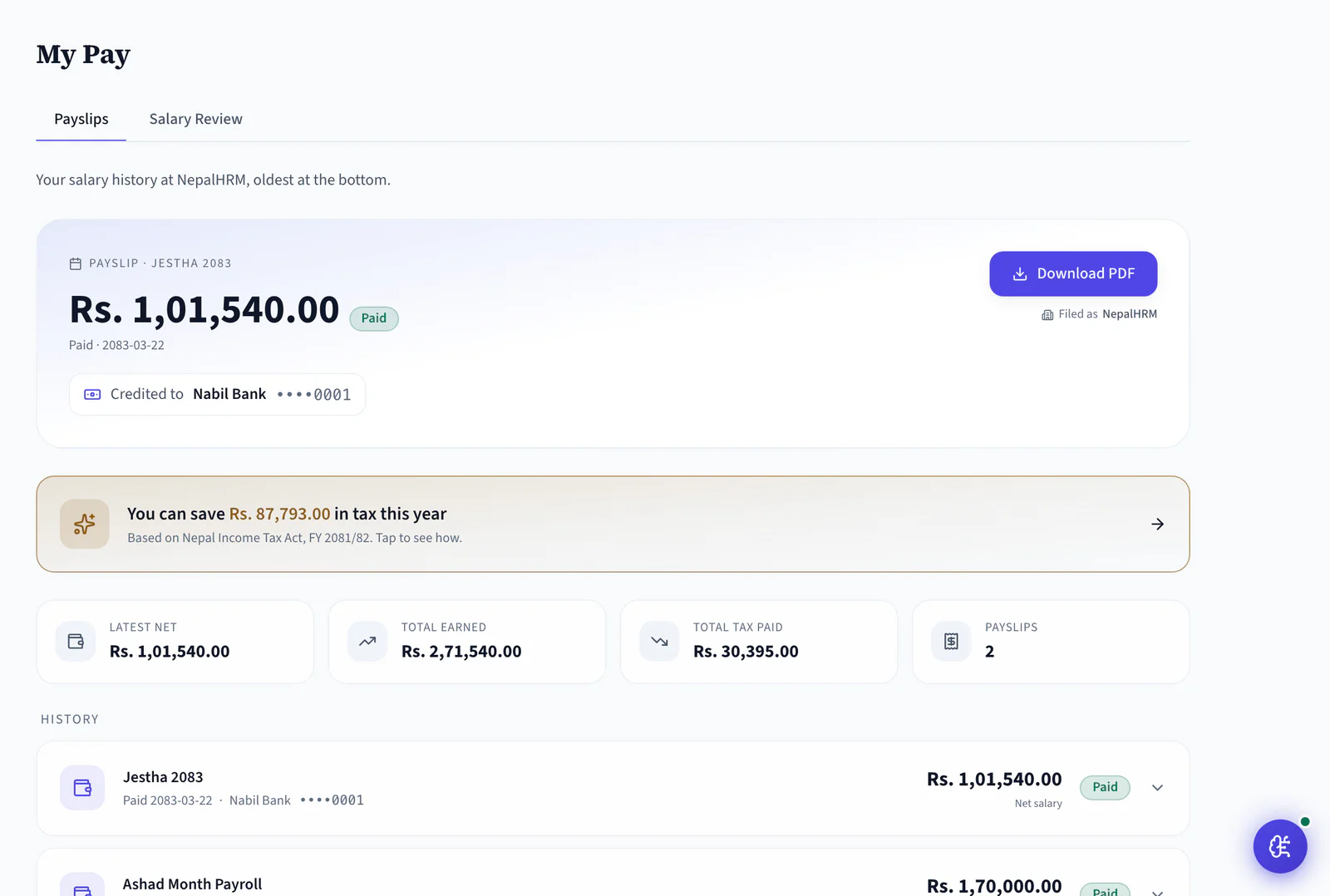
Every month on file with its own PDF, plus year-to-date earnings and tax. The bank account shows as ••4417, masked before it ever reaches the browser.
Tax Saving, in Their Own Words
The payslip page carries the year's saving in a line the employee can act on: "You can save Rs. 87,793.00 in tax this year", linked straight to the planner.
My Tax Planner
Projected annual TDS with a CIT slider that shows take-home changing live, against the Section 63 ceiling of one-third of assessable income or NPR 500,000.
Leave Balance and Requests
Balance by leave type, the company holiday calendar, and an application that routes to the right approver.
My Attendance
Own punch history, late marks and half days, with a regularization request when a punch is genuinely missing.
Expense Claims
Submit a claim with the bill attached, watch it move through approval, and see it land in a payroll cycle.
Profile Change Requests
Personal details are read-only. Request Change sends the edit to HR as an approval, and the field carries a Pending badge until it is decided.
My Job Description
The JD for the position, with an acknowledgement the employee signs off in the app. Available on every plan, including Free.
Raise a Helpdesk Ticket
For the requests that genuinely need a person: a typed, prioritised ticket with an owner instead of a message that scrolls away.
Org Chart and Directory
Who reports to whom, searchable, so a new joiner stops asking which floor finance sits on.
My Documents
Contract, appointment letter and policies in one folder, with acknowledgements recorded against the employee.
The Same Portal on Mobile
Android and iOS carry the same screens, with push notifications for approvals. Mobile is on every plan, Free included.
Invited on Monday, Self-Sufficient by Friday
Self-service is not a rollout project. It is an invitation, a first login and a habit.
- Day 0
Invited
HR sends the invitation from the employee record. No IT ticket, no account created by hand.
- Day 1
First login
The employee sets a password, installs the app and sees their own dashboard, not an admin console.
- Week 1
Profile completed
Emergency contacts, nominees and bank details filled in by the person who actually knows them.
- Every month
Self-serving
Payslip downloaded, leave applied for, tax modelled before Ashadh. None of it reaches HR's inbox.
Stop Being the Lookup Service for Your Own System
The work does not disappear, it moves to the person who was going to ask about it anyway. That is the whole return on a self-service portal.
HR as the Front Desk
- Payslips forwarded one Viber message at a time
- Tax questions answered by Finance, one employee at a time, every Ashadh
- Leave balances quoted from a spreadsheet that may be a week old
- Address changes noted on paper, entered later, sometimes
Invite the Team, Then Get Out of the Way
One track for the rollout, one for the employee's month, one for the work that stops landing on HR.
- Select the people, send the invitations. Accounts are created against records that already exist, so nobody is typed in twice.
- Six access roles decide who sees a team and who sees only themselves. An employee's default view is their own record and nothing else.
- Emergency contacts, nominees, education and bank details are filled in by the person who knows them, not copied off a form.
- Android and iOS carry the same screens. Push notifications bring approvals and announcements to the phone.
- The month lands on the dashboard with net pay and the masked bank account. One tap gives the PDF, and every earlier month is still there.
- Balance by leave type against the same ledger payroll reads, the holiday calendar beside it, and an application that routes to the approver.
- Attach the bill, submit, and watch it move through approval into a payroll cycle instead of chasing it at month end.
- The planner projects annual TDS and models a higher CIT contribution against the Section 63 ceiling, showing take-home change as the slider moves.
- The month publishes and every employee has their own copy. Nobody attaches a PDF to a message again.
- Ashadh normally fills Finance's calendar with one-at-a-time CIT conversations. The planner answers most of them at 11pm.
- A change arrives already typed, with the old and new value side by side. HR approves or rejects instead of re-keying.
- Genuine questions arrive as helpdesk tickets with an owner and a thread, so they get answered once and stay answered.
Invitations, Not Account Creation
My Payslips
Published Once, Read by Everyone
One Portal, Three Different Views
What an employee sees, what a manager sees and what HR keeps control of are three separate things, decided by role.
For Employees
Your record, your questions
- Own payslips, leave balance, attendance and documents, nobody else's
- A tax projection and CIT what-if they can run themselves
- Profile changes submitted as requests, tracked until decided
For Managers
The team, not the payroll
- Team leave calendar and pending approvals for direct reports
- Attendance and regularization requests to act on
- No access to a report's salary, bank details or tax record
For HR
Fewer errands, more control
- Invitations sent from records that already exist
- Profile edits arrive as approvals with old and new values shown
- Six access roles decide exactly who can see what
Self Service for Every Kind of Team in Nepal
Offices, factory floors, retail chains and field teams. The further the employee sits from HR's desk, the more the portal is worth.
Self Service Runs On the Rest of the System
The portal invents no data of its own. Every screen reads the module that owns it, which is why the numbers agree with what HR sees.
Mobile App
The same portal on Android and iOS, with push notifications for approvals and announcements.
Payroll Software
Payslips and the TDS projection both read the payroll run, not a copy of it.
Leave Management
The balance an employee sees is the ledger the approval and the payroll deduction both use.
Helpdesk
For what self-service cannot answer: a typed ticket with an owner, instead of a message that scrolls away.
Training & LMS
Employees find the course catalogue, sit the assessment and download their own certificate without opening a ticket.
Expense & Reimbursement
A field visit is claimed from the phone with the bill attached, and the approved amount reaches the next payslip.
Loans & Salary Advances
Staff request an advance, watch the EMI schedule and see each recovery on the payslip that made it.
Employee Self Service is one module of the all-in-one HR software for Nepal, so an employee is created once and every module above reads the same record.
Simple, Transparent Pricing
No Hidden Fees
NepalHRM gives you enterprise-grade HR software at a price built for Nepali businesses of every size.
- All core HR modules
- Nepal payroll compliance
- PF, SSF, CIT & eTDS
- Biometric integration
- Free onboarding support
- Regular feature updates
- Multi-company support
- BS + AD calendar
Free trial available, no card required · No setup fees · Cancel anytime
One Portal on the Web, Android and iOS
A payslip downloaded on the bus, a leave request approved from a site visit, a tax plan reworked at home the night before the CIT deadline.
Frequently Asked Questions
Everything you need to know about employee self service in NepalHRM before you get started.
No. Self service is how employees use NepalHRM, not a separate product, so it is included in the per-employee price of the plan you are on. Free covers up to 10 employees at no cost. See /pricing for the current per-employee rates and what each tier includes.
Yes. My Payslips holds the full history, each month with its own PDF, alongside year-to-date earnings and tax. The bank account is masked to its last four digits server-side, so the full number never reaches the browser even for the employee's own record.
Yes, but HR produces it today, from the statutory reports section. The employee-facing version of that screen is built and not yet switched on, so for now a loan letter is still a request to HR. What an employee can pull themselves is the full payslip history, which most Nepali banks accept alongside the certificate.
Yes, for personal information. Those fields are read-only to the employee, and Request Change sends the edit to HR with the old and new values shown side by side. The field carries a Pending badge until HR approves or rejects it, so nothing changes silently.
Yes. My Tax Planner projects TDS for the BS fiscal year and lets an employee model a higher CIT contribution against the Section 63 ceiling, which is the lower of one-third of assessable income or NPR 500,000. Take-home pay updates live as the slider moves.
Yes. The mobile app carries the same self-service screens as the web portal and is included on every plan, Free included. Approvals and announcements arrive as push notifications, which is what makes the portal work for people who are never at a desk.
A manager sees their direct reports: the team leave calendar, pending approvals and attendance to act on. They do not see a report's salary, bank details or tax record. Six access roles set the boundary, and an employee's default view is their own record only.
The web portal carries every self-service screen and works on any shared computer, so a factory or site office can run one terminal for the whole shift. HR can also still act on an employee's behalf from the admin side when someone genuinely cannot get online.
Give Your Team the Answers. Give HR Back the Day
Join hundreds of Nepali businesses that have already moved from manual HR to NepalHRM. The questions do not stop; they just stop landing on one desk.
- No credit card
- Free onboarding
- Set up in one day
- Cancel anytime