Leave Management Software Built for Nepali Workplaces
Stop chasing leave requests across chat and spreadsheets. NepalHRM handles leave types, accruals, approvals, balances, carry-forward and encashment in both BS and AD calendars, connected directly to attendance and payroll.
- No credit card
- Set up in one day
- Free onboarding
How does leave management software work in Nepal?
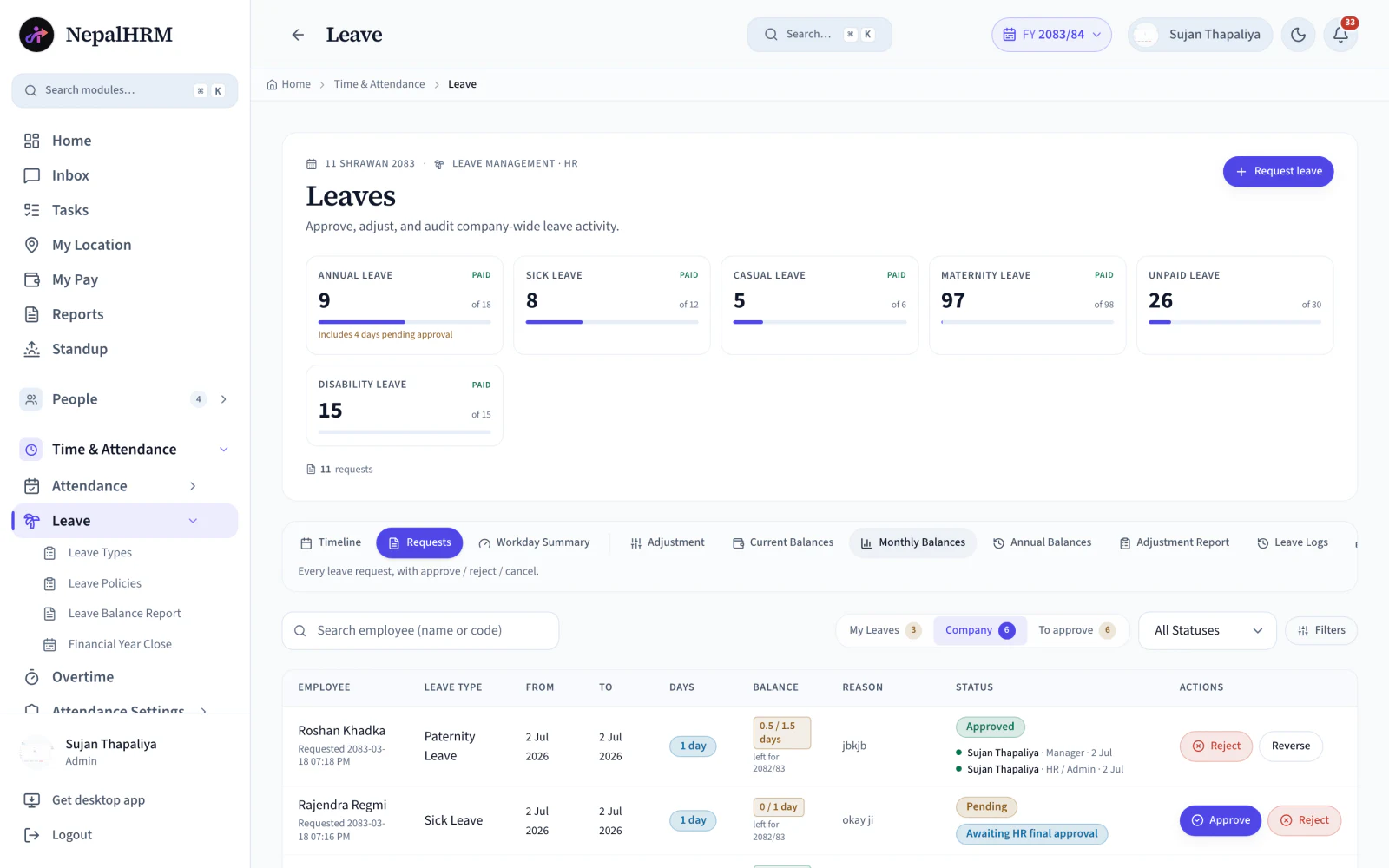
Leave management software holds each employee's entitlement, applies your policy when they ask for time off, and keeps the balance correct without anyone maintaining a spreadsheet. In Nepal the leave year normally follows the fiscal year rather than the calendar year, which is exactly the assumption a generic tool gets wrong. NepalHRM encodes the leave types, accrual and carry-forward once, so every request after that is decided the same way by the same rules.
- Every request is logged with its dates, its reason and the approver who decided it.
- Balances update the moment leave is approved, so the next request is made against a real number.
- Holiday and weekend overlaps resolve by leave-type priority rules instead of case by case.
- Approved unpaid leave flows straight into that month's payroll, with no export in between.
- Accrual, carry-forward and encashment run on the Nepali fiscal year, in both BS and AD.
Last updated · Reviewed by Rajendra Regmi, Co-founder
Trusted by 500+ businesses in Nepal, from startups to giants
- 1-click
- Approve/reject with audit trail
- BS + AD
- Dual calendar & Nepali fiscal year
- Auto
- Accrual, carry-forward & encashment
- 0 Excel
- Payroll-ready balances, no exports
Leave Tracking Breaks Down in Chats and Spreadsheets
When requests live in messages and balances live in Excel, HR spends more time reconciling than managing.
- Requests arrive over chat and email, then get lost or forgotten
- Balances in Excel are outdated the moment someone takes a half day
- Leave overlapping holidays and weekends gets counted wrong
- Payroll never quite matches the leave that was actually approved
One Connected System for Leave, Attendance and Payroll
Every request, approval and balance lives in one place, and payroll reads from it directly.
What NepalHRM gives you
- Every request is logged with dates, reason and approver trail
- Balances update automatically the moment leave is approved
- Holiday and weekend overlaps resolve by leave-type priority rules
- Approved unpaid leave flows straight into that month's payroll
Modules That Leave Management Software Must Have to Manage Leave in Nepal
Manage leave types, policies, requests, approvals, balances, reports and the financial year close from one clear leave system built for businesses in Nepal.
See leave across the company at a glance
Pending request counts, today's absences, and team availability sit right on the HR dashboard, so nobody has to dig through records.
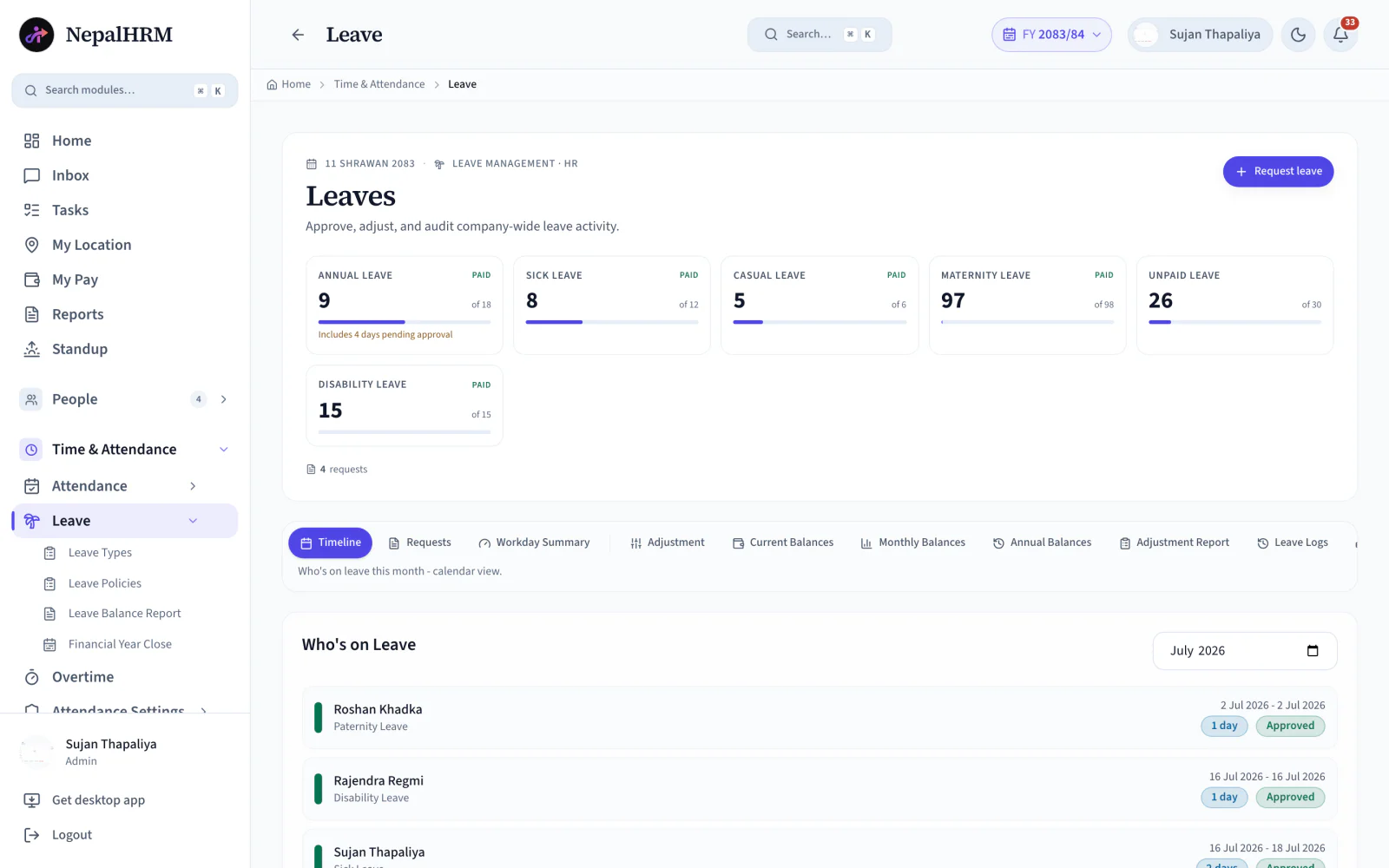
- Track pending requests and “who's on leave today” from one view.
- Spot overlapping team absences before they become a problem.
- Jump straight from a dashboard alert to the request itself.
All Features for Managing Leave in NepalHRM
From defining leave types to closing the financial year, everything HR needs to run leave for a Nepali company, without a single spreadsheet.
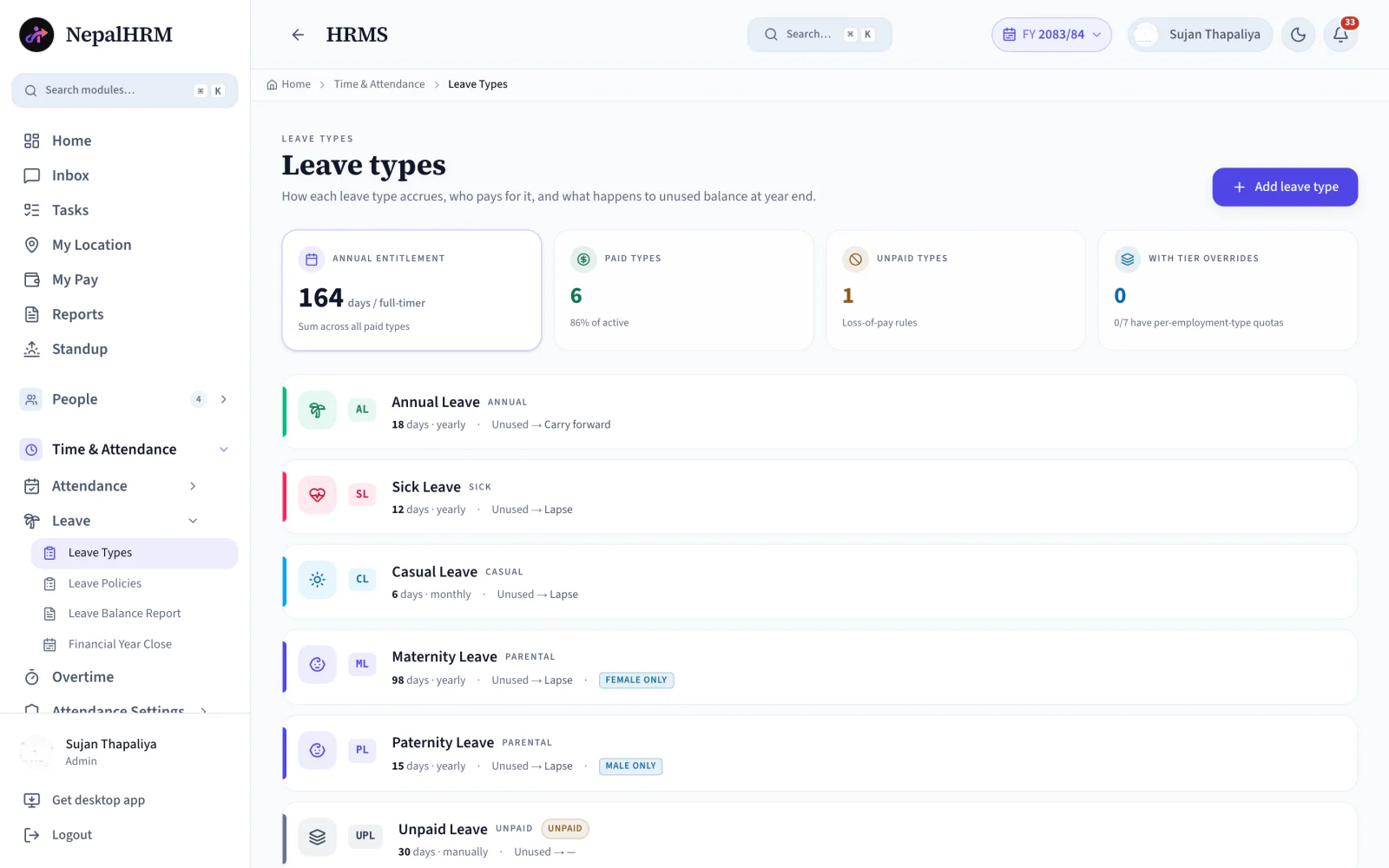
Custom Leave Types
Annual, sick, casual, maternity, paternity and unpaid, each with a short code (AL, SL) for compact reports.
Accrual Engine
Yearly, monthly, manual, compensatory or automatic accrual, set per leave type and applied without HR effort.
Carry Forward & Encashment
Decide what happens to unused days at year end: lapse, encash or carry forward, by rule and not by memory.
Leave Policies
Different rules for different departments, roles and probation staff, all from the Leave Policies page.
Approval Workflow
Managers approve or reject with a mandatory rejection reason. HR fallback approval keeps requests moving.
Balance Reports
Current, monthly and annual balances per employee, plus adjustment reports, ready to export any day.
Nepali Calendar
BS + AD dual dates, fiscal-year (2083/84) aware balances, and a proper financial year close.
Holiday Overlap Rules
An order column decides which leave type applies first when requests overlap holidays or weekends.
Filter Tabs & Views
My Leaves, Company and To Approve tabs with status filters, so everyone finds their requests instantly.
Leave Logs & Audit
Every request, approval, rejection and adjustment is logged: who did it, when, and why.
Dashboard Alerts
Pending request counts and a who-is-on-leave-today tab sit right on the HR dashboard.
Timeline & Summaries
Leave timeline, workday summaries and matrix views (AL, UPL, HD) show the whole company at a glance.
Move Leave from Chat Messages to Payroll-Ready Balances
A leave request is only the start. NepalHRM turns it into an approved record, an updated balance, and a number payroll can actually use.
Manual Leave Tracking
- HR keeps balances in Excel and updates them by hand
- Managers approve verbally; nothing is recorded or auditable
- Carry-forward and encashment computed once a year, by hand
- Finance waits for HR to prepare final leave data every month
How to Set Up NepalHRM for Leave?
NepalHRM leave is not just a request form. It connects leave types, policies, accruals, approvals, balances and the financial year close into one clean process.
- Create each leave type with its short code (AL, SL), accrual method, days per year, paid or unpaid status and the unused-leave rule, then group them into policies per department or role.
- Assign leave policies to employees and set reporting managers as approvers, with HR fallback approval so no request ever stalls.
- Employees request from web or mobile, managers approve with one click, and at financial year close unused leave lapses, encashes or carries forward by rule.
One Leave System, Different Views for Different Teams
Everyone sees exactly what they need: nothing more, nothing missing.
For Employees
Request in seconds, track everything
- See live balances for every leave type
- Request from web or the mobile app
- Follow request status: pending to approved
For Managers
Approve with context, not guesswork
- A To Approve tab lists your team's pending requests
- See balance and reason before deciding
- Rejections require a written reason
For HR
Company-wide control and clean reports
- Who is on leave today, right on the dashboard
- Adjustments, balance reports and leave logs
- Fallback approval and financial year close
Leave Management Software Built for Every Business in Nepal
Leave gets harder as teams grow, policies multiply and calendars differ. NepalHRM handles leave for businesses of every size, from every industry.
Leave Connects Every Module
Approved leave is not a separate spreadsheet. It writes to attendance, adjusts payroll and shows up in reports, all from one platform.
Attendance & Biometric
Approved leave lands on the attendance record, so a day off is never flagged as an absence.
Payroll Software
Unpaid leave adjusts the payroll draft and encashment amounts flow into the same run. No exports.
Employee Management
Leave policies and approval routing follow the employee profile and its reporting manager.
Mobile App
Employees check balances and request leave, managers approve, from Android and iOS.
Reports & Exports
Balance, adjustment and leave-log reports export to Excel, PDF or CSV whenever finance asks.
Holidays & BS Calendar
Nepal public holidays and the Bikram Sambat fiscal year drive every deduction and balance.
Simple, Transparent Pricing
No Hidden Fees
NepalHRM gives you enterprise-grade HR software at a price built for Nepali businesses of every size.
- All core HR modules
- Nepal payroll compliance
- PF, SSF, CIT & eTDS
- Biometric integration
- Free onboarding support
- Regular feature updates
- Multi-company support
- BS + AD calendar
Free trial available, no card required · No setup fees · Cancel anytime
Access NepalHRM from the
Web, Android and iOS
HR teams can manage leave from the desk, managers can approve from mobile, and employees can check balances anytime.
Frequently Asked Questions
Everything you need to know about NepalHRM leave management before you get started.
Yes. Dates display in English (AD), Nepali (BS), or both, and leave balances follow the Nepali fiscal year, for example FY 2083/84, with a proper financial year close.
You decide per leave type: it can lapse, be encashed, or carry forward. The rule is set once on the leave type and applied automatically at year close.
Yes. HR fallback approval lets HR approve or reject any pending request directly, so employees are never stuck waiting on an unavailable manager.
Directly. Approved unpaid leave flows into that month's payroll run, and paid-leave balances stay consistent with attendance. No exports or re-entry.
Yes. Create any leave type with its own accrual method, days per year, paid or unpaid status and unused-leave rule, then assign policies per department or role.
Yes. The NepalHRM mobile app on Android and iOS lets employees check balances, request leave and track approval status from anywhere.
Official Leave & Labour Sources
Leave entitlements in Nepal are set by the Labour Act and the rules published under it. NepalHRM keeps every entitlement, accrual and year-end rule configurable, so you can match the law and your own policy instead of a hard-coded day count.
- Labour Act 2074 (2017)Statutory leave entitlements & employment terms
- Ministry of Labour, Employment & Social SecurityLabour rules, circulars & public holiday notices
- Social Security Fund (SSF)Medical, maternity & dependant benefit schemes
- Inland Revenue Department (IRD)Tax treatment of leave encashment in payroll
Leave management is one module of the all-in-one HR software for Nepal, so a sanctioned day is already deducted by the time payroll runs.
Leave terms, defined
Every leave type below is granted by the Labour Act 2074, and each definition cites the section it comes from.
- Sick Leaveबिरामी बिदाSick leave is paid leave for illness. Under Nepal's Labour Act 2074 an employee is entitled to twelve days a year at full remuneration, and unused days accumulate up to forty-five.
- Home Leaveघर बिदाHome leave is Nepal's annual paid leave entitlement. Under the Labour Act 2074 an employee earns one day of home leave for every twenty days worked, and unused days accumulate up to a ceiling of ninety.
- Maternity Leaveप्रसूति बिदाMaternity leave in Nepal is ninety-eight days under the Labour Act 2074, of which sixty days are paid at full remuneration. It can begin before the expected delivery date, and the entitlement is the employee's regardless of length of service.
- Paternity Leaveपितृत्व बिदाPaternity leave in Nepal is fifteen days of paid leave for an employee whose spouse has given birth, granted under the Labour Act 2074. It is sometimes referred to as maternity care leave.
- Mourning Leaveकिरिया बिदाMourning leave is thirteen days of leave granted to an employee who has to perform funeral rites, under Nepal's Labour Act 2074. It is commonly called kriya bida.
- Public Holidaysसार्वजनिक बिदाPublic holidays are the days off an employer must grant in addition to the weekly rest day. The Labour Act 2074 sets thirteen days a year, with one additional day for female employees, and the specific dates follow the government's annual calendar.
- Leave Encashmentबिदा सटहीLeave encashment is the conversion of an unused leave balance into money. In Nepal it applies to home leave that has accumulated beyond the ninety-day ceiling, and to the remaining balance when an employee leaves.
All HR and payroll terms used in Nepal are defined in the glossary, each with the Act or rate it comes from.
Leave, by sector
The Labour Act 2074 fixes the entitlements. The calendar they are granted against is a sector decision, and it is where most leave policies actually differ.
- Schools & collegesThe academic calendar rather than the office one: term breaks, exam leave and vacation leave, across campuses.
- Hotels & restaurantsBlackout dates, so Dashain and the peak weeks are closed to leave requests before they are made.
- Hospitals & clinicsLeave read against a 24/7 roster published week by week, where a shift left uncovered is the real constraint.
All eight sector setups are on the HR and payroll software by industry hub, each one a configuration of the same platform rather than a different product.
Move Leave Out of Chat and into One Connected System
Stop reconciling leave balances in Excel every month. Use NepalHRM to run leave types, approvals, balances and the year-end close from one leave management software built for Nepali companies.
- No credit card
- Free onboarding
- Set up in one day
- Cancel anytime