Every Workplace Problem, One Ticket Away From Solved
A broken laptop, a payroll question, a leave dispute: employees raise a ticket in seconds, HR assigns it to the right person, and the comment thread keeps the whole story until it is resolved.
- No credit card
- Quick set up
- Free onboarding
What is an HR helpdesk?
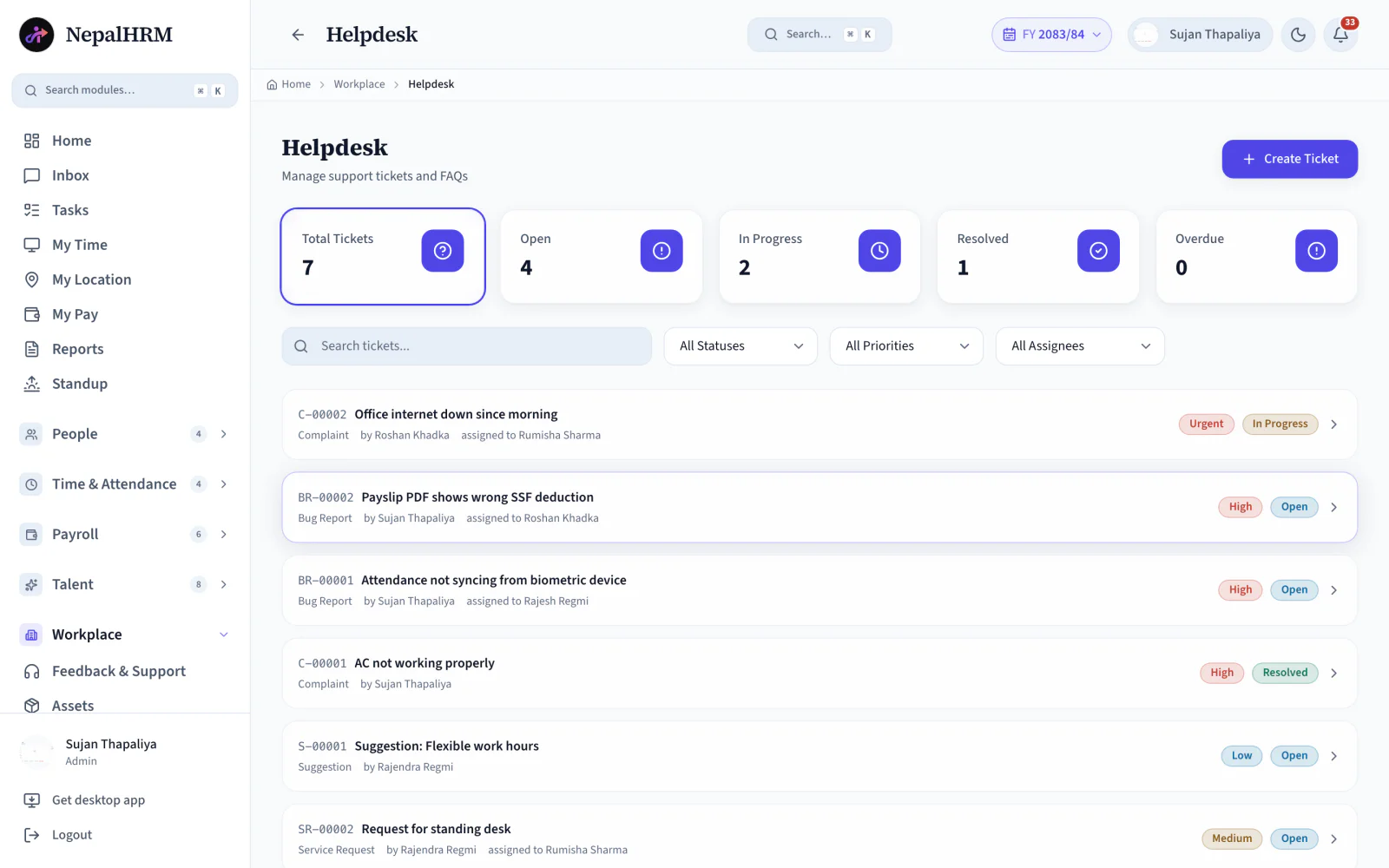
An HR helpdesk turns internal requests into tickets so they stop living in chat messages and corridor conversations. In NepalHRM an employee raises a ticket with a title, a type and a priority in about 30 seconds. Every ticket carries one named assignee and stays on the board until somebody clicks Resolve, so a request cannot quietly fall off the end of a busy week.
- Employees raise tickets for IT issues, HR queries, asset requests and anything else that needs an owner.
- Five counters sit above the queue: total, open, in progress, resolved and overdue.
- Every ticket keeps its full comment thread until it is resolved.
- Tickets are assigned by name, so “someone will look at it” is not a state the system allows.
- Because the helpdesk sits inside the HR system, a ticket about payroll or leave already knows who the employee is.
Last updated · Reviewed by Rajendra Regmi, Co-founder
From raised hand to resolved ticket, nothing gets lost
- 30 sec
- Title, type, priority: ticket raised
- 5 Counters
- Total, open, in progress, resolved, overdue
- 1 Owner
- Every ticket assigned by name
- Full Thread
- Comments kept until it's resolved
Complaints Everywhere, Answers Nowhere
Requests arrive by chat, phone, email and shoulder tap. Some get fixed twice, most get forgotten, and nobody can prove either.
- IT issues, HR queries and asset requests scattered across channels
- No owner, so urgent problems sit unclaimed for days
- The back-and-forth lives in private chats nobody else can see
- The same questions answered again and again, never written down
One Queue, One Owner, One Thread
Every request becomes a ticket with a type, a priority and an assignee, and stays visible until someone clicks Resolve.
What NepalHRM gives you
- Employees raise tickets for IT issues, HR queries, asset requests and more
- Live counters show Total, Open, In Progress, Resolved and Overdue at a glance
- HR assigns each ticket to a specific employee, so ownership is never vague
- The comment thread keeps requester and resolver on the same record
Everything a Ticket Needs, From Raised to Resolved
A complete internal support desk: typed, prioritised, assigned, discussed and closed in one place.
30-Second Ticket Form
Title, description, type and priority. That is the whole form, on web or mobile.
Ticket Types
IT issues, HR queries, asset requests and more, so the right desk sees the right problem.
Priorities
Low to urgent, set at creation and visible in the queue, so urgent work actually goes first.
Live Board Counters
Total, Open, In Progress, Resolved and Overdue, always current at the top of the board.
Assignment by Name
HR assigns each ticket to a specific employee. Ownership is explicit, never assumed.
Comment Threads
Requester and resolver talk on the ticket itself, so the whole story stays in one place.
Search & Filters
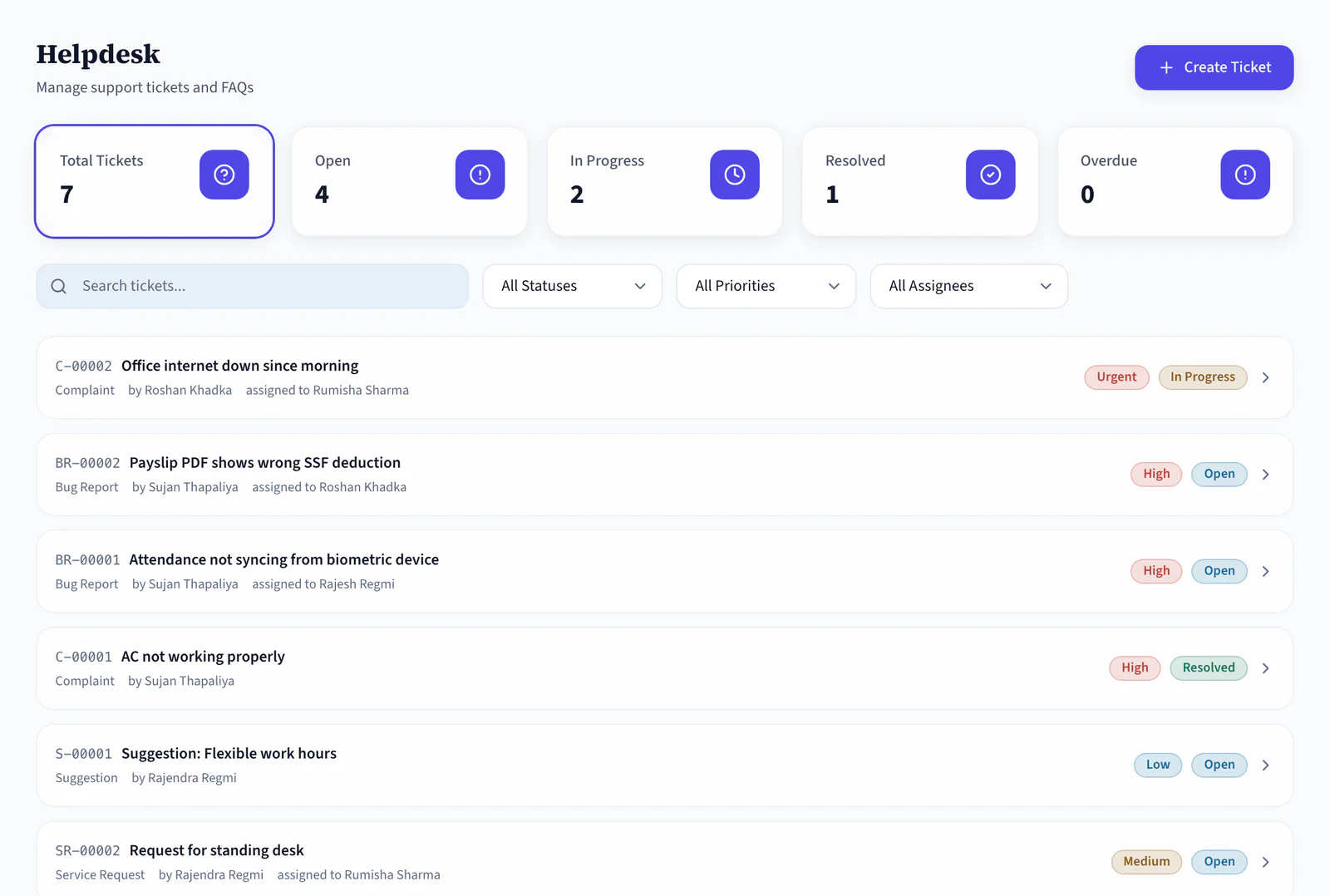
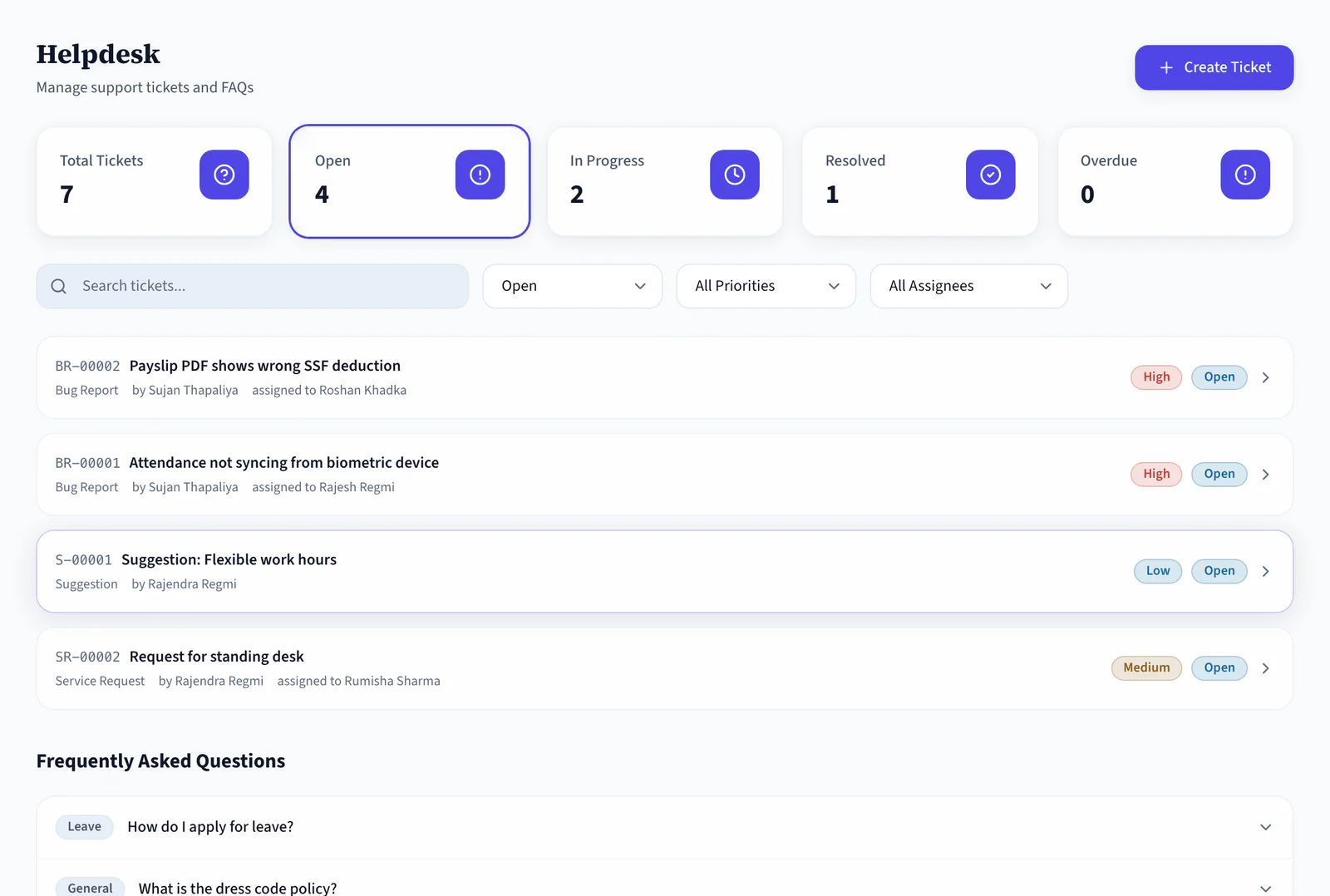
Find any ticket by text, or slice the queue by status, priority and assignee.
One-Click Resolve
Click Resolve when it is fixed. Counters update, and the record stays for next time.
Overdue Surfacing
Tickets that sit too long get their own counter, so a problem cannot quietly disappear.
Resolved History
Closed tickets stay searchable, so recurring issues read as patterns instead of anecdotes.
Raise From Anywhere
The same 30-second form on Android and iOS, for the people who are never at a desk.
Asset-Aware Requests
Hardware requests and broken-equipment reports line up with the asset register and its holders.
From Raised Hand to Resolved Ticket
Four states the board tracks for you, so a problem cannot quietly disappear halfway through.
- Open
Raised
The employee submits title, type, description and priority. The ticket joins the queue.
- In progress
Assigned
HR assigns it to the person who can fix it, and the thread starts on the detail view.
- Overdue
Flagged
Tickets that sit too long surface in their own counter, so nothing dies quietly.
- Resolved
Closed
One click marks it done. The thread and the resolution stay searchable.
Move Support Out of Chat Without Losing the Story
A good helpdesk should shorten the path to a fix, not add bureaucracy. NepalHRM keeps every request owned, visible and on the record until it is closed.
Support by Chat
- Requests buried under newer messages by lunch
- No priority, so small favours jump ahead of real problems
- Who is fixing it depends on who read the message first
- Nothing is overdue, because nothing has a deadline
Raise in Seconds, Resolve on the Record
One side raises, the other side resolves. The ticket keeps both honest.
- From the Helpdesk board, on web or mobile. No new tool to learn, no separate login.
- A short title, the details in the description, the ticket type and a priority (Medium by default).
- The ticket appears in the queue and every update lands in its comment thread.
- If the resolver needs more detail, answer on the ticket. No new chat, no lost context.
- Five counters plus filters by status, priority and assignee show exactly where the queue stands.
- Click a ticket for the detail view and assign it to the person who can actually fix it.
- Comments, status changes and assignment all happen in the detail view, visible to both sides.
- The counters update and the record stays searchable for the next time it comes up.
Start From the Board
Filter to What Is Open
One Desk, a Clear Job for Everyone
Employees get answers, resolvers get a queue, and managers get the numbers.
For Employees
Ask once, watch it move
- One form for every kind of request, 30 seconds to fill
- Ticket status visible anytime, no follow-up messages needed
- The whole conversation stays on the ticket
For Resolvers
A queue instead of a flood
- Only your assigned tickets, sorted by priority
- Everything you need to fix it sits in the description and thread
- Click Resolve and the queue gets shorter, provably
For Managers
The numbers behind the noise
- Five counters tell the health of support at a glance
- Overdue tickets cannot hide; they are a counter of their own
- Recurring issues show up as patterns, not anecdotes
A Helpdesk Built for Every Business in Nepal
Wherever requests outnumber the people fixing them, a queue beats a chat.
The Helpdesk Connects Every Module
Most tickets are really about something else: a laptop, a payslip, a leave balance or a new joiner's access. The desk sits next to all of them.
Asset & Procurement
Hardware tickets line up with the register, so a broken laptop updates the item's condition too.
Payroll Software
Payslip and TDS questions become typed tickets routed to finance instead of hallway conversations.
Leave Management
Balance disputes and policy questions get an owner and a written answer that lasts.
Onboarding & Offboarding
Day-1 access problems and exit access removals are raised, owned and closed on the record.
Employee Management
Requesters, assignees and departments all come from the same employee records.
Mobile App
Raise a ticket from the field, assign one from your desk, resolve from wherever the fix happens.
Employee Engagement
A ticket answers one person. An announcement answers the forty who were about to raise the same one.
Helpdesk is one module of the all-in-one HR software for Nepal, so an employee is created once and every module above reads the same record.
Simple, Transparent Pricing
No Hidden Fees
NepalHRM gives you enterprise-grade HR software at a price built for Nepali businesses of every size.
- All core HR modules
- Nepal payroll compliance
- PF, SSF, CIT & eTDS
- Biometric integration
- Free onboarding support
- Regular feature updates
- Multi-company support
- BS + AD calendar
Free trial available, no card required · No setup fees · Cancel anytime
Access NepalHRM from the Web, Android and iOS
Raise a ticket from the field, assign one from your desk, and resolve from wherever the fix happens.
Frequently Asked Questions
Everything you need to know about helpdesk in NepalHRM before you get started.
Anything internal: IT issues, HR queries, asset requests, facility problems, payroll questions. Ticket types keep them sorted so each request reaches the right resolver.
Click + Create Ticket, enter a short title, describe the issue, pick a type and a priority (Medium by default), then submit. It takes about 30 seconds.
HR or admin assign each ticket to a specific employee, whoever can actually fix it: IT for hardware, finance for payroll questions, admin for facilities. The assignee sees it in their queue.
On the ticket. The detail view holds the comment thread, status changes and assignment history, visible to both requester and resolver, so context never gets lost in private chats.
The board counts Open, In Progress and Overdue tickets separately, and filters by status, priority and assignee show exactly what is stuck and with whom.
Yes. The five live counters give the health of the queue at a glance, and the resolved history shows what kinds of issues keep coming back, so root causes get fixed too.
Stop Fixing Problems Twice. Start Resolving Them Once
Join hundreds of Nepali businesses that have already moved from manual HR to NepalHRM. Your team deserves better than a buried chat message.
- No credit card
- Free onboarding
- Set up in one day
- Cancel anytime