Employee Onboarding and Offboarding, Managed From One System
Guide every new hire from offer acceptance to day 30 with clear tasks for pre-joining, day 1, the first week and the first month. When an employee leaves, run the notice period, clearance tasks and exit interview through the same system. Every step stays visible from start to finish.
- No credit card
- Set up in one day
- Free onboarding
What does onboarding and offboarding software do?
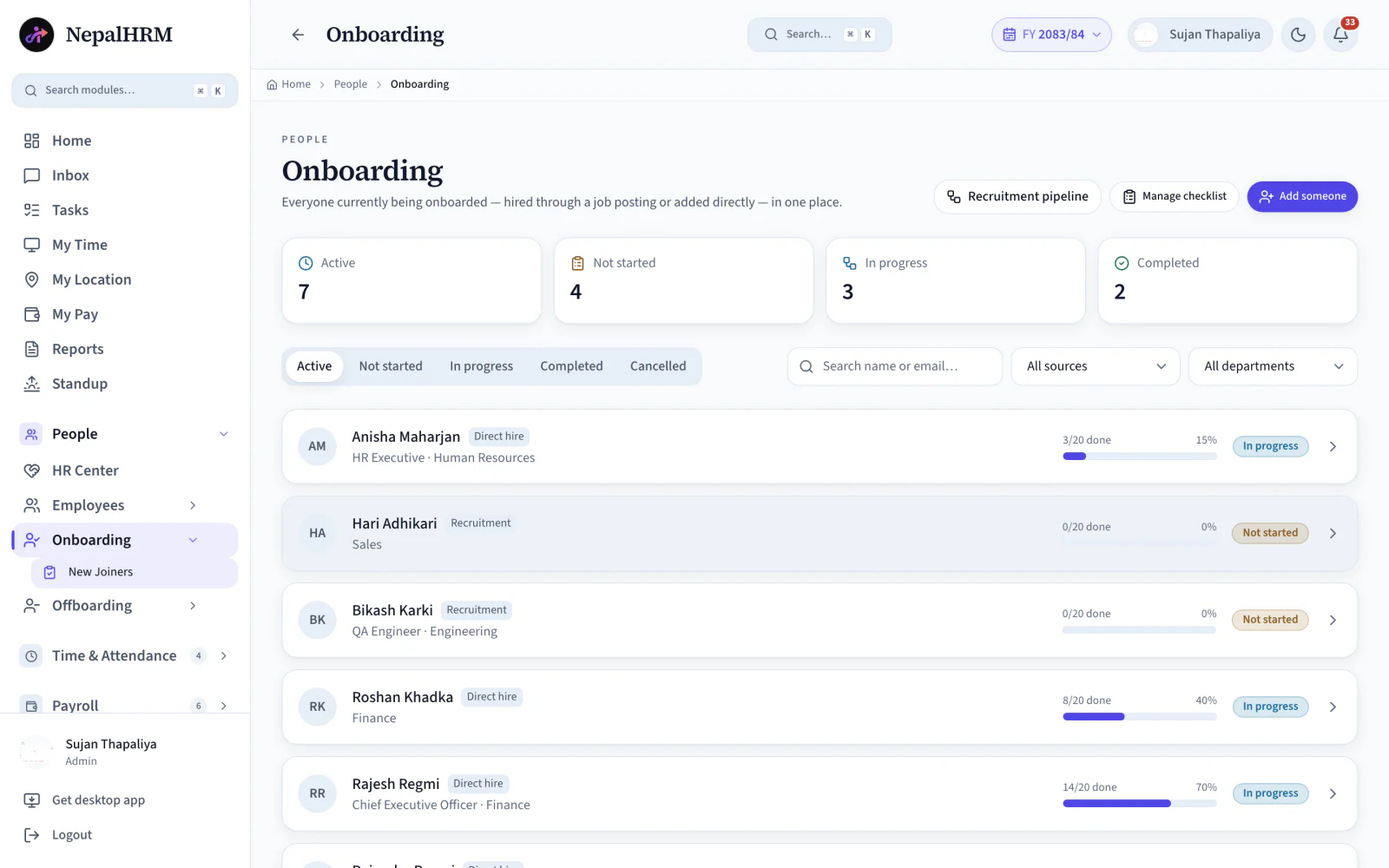
Onboarding and offboarding software runs a joiner's first month and a leaver's last one as staged boards with tasks, owners and live completion, rather than as a checklist in somebody's inbox. NepalHRM ships a ready-made onboarding template covering pre-joining, day-one account setup, day-one policy signing, the first week and first-month training, and a separate exit process for clearances and handovers.
- The onboarding template carries 20 tasks across those stages, each one with an owner.
- Offboarding runs nine stages covering clearances, handovers and exit requirements.
- A seven-day alert fires before an employee's final working day.
- Completion is live on the board, so progress is a glance rather than a status meeting.
- Tasks are assigned to whoever owns them — IT, finance or the reporting manager — instead of all landing on HR.
- Both boards read the same employee record, so a joiner's accounts, assets and documents are the list a leaver has to return.
Last updated · Reviewed by Rajendra Regmi, Co-founder
From offer acceptance to final clearance, every step stays on track
- Offer → Day 30
- Guide new hires through every onboarding stage
- 20 Tasks
- A ready-made checklist for key joining activities
- 9 Stages
- Clearances, handovers and exit requirements
- 7-Day Alert
- Warning before the employee's final working day
New Hires Wait, Leavers Walk Out With the Laptop
Without a defined process, the first week and the last week are both improvised, and both leave gaps.
- Day-one setup scattered across emails, with laptop, accounts and documents each owned by someone different
- Nobody can say how far along a new hire actually is
- Exits handled ad hoc: assets unreturned, dues unclear, no exit interview
- Final settlement computed after the person has already left
Two Checklists, Every Step Visible
Onboarding and offboarding each run as staged boards with tasks, owners and live completion. Progress is a glance, not a meeting.
What NepalHRM gives you
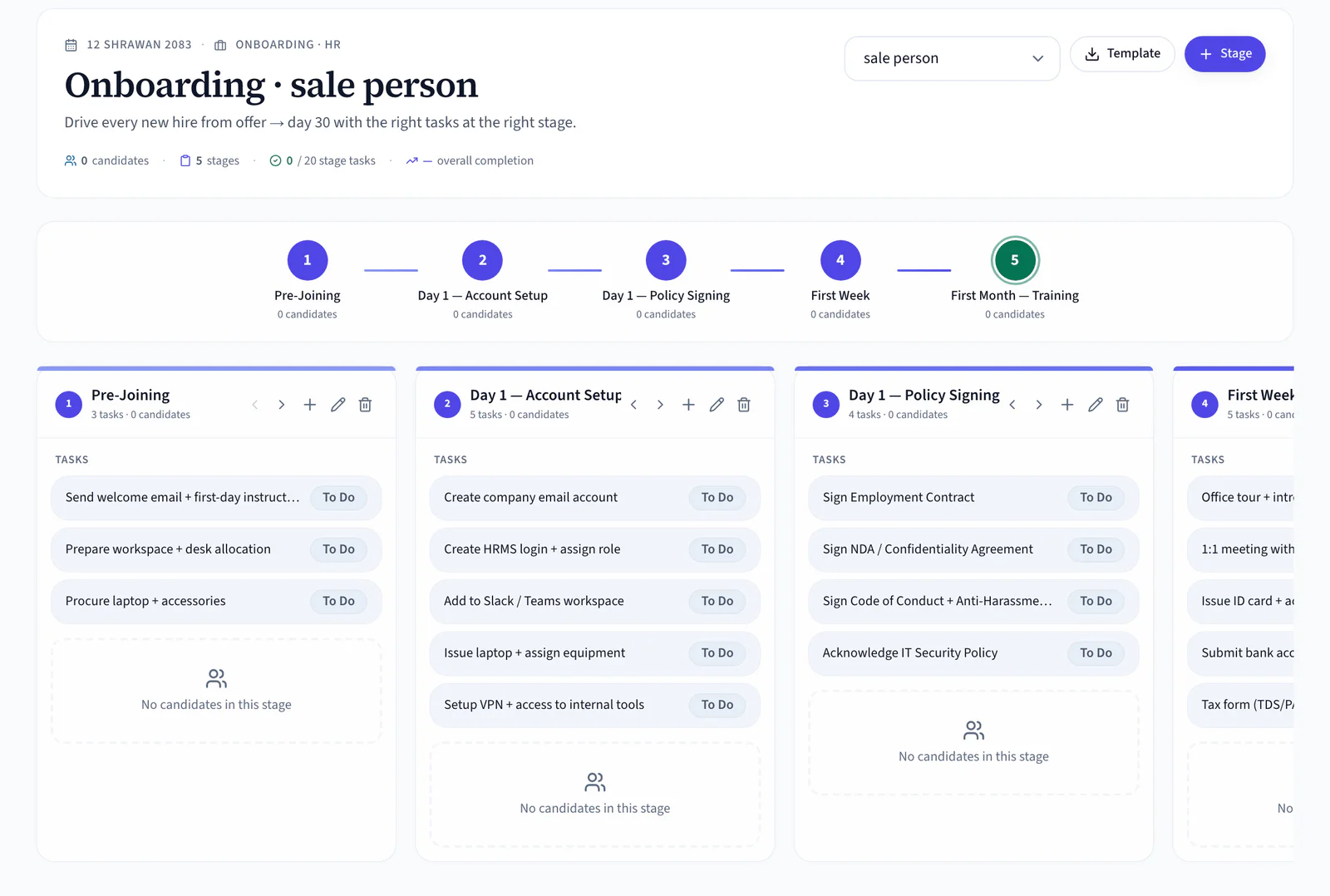
- A ready-made onboarding template: Pre-Joining, Day 1 Account Setup, Day 1 Policy Signing, First Week, First Month Training
- 20 stage tasks out of the box: welcome email, laptop, HRMS login, NDA, ID card, bank details, TDS/PAN
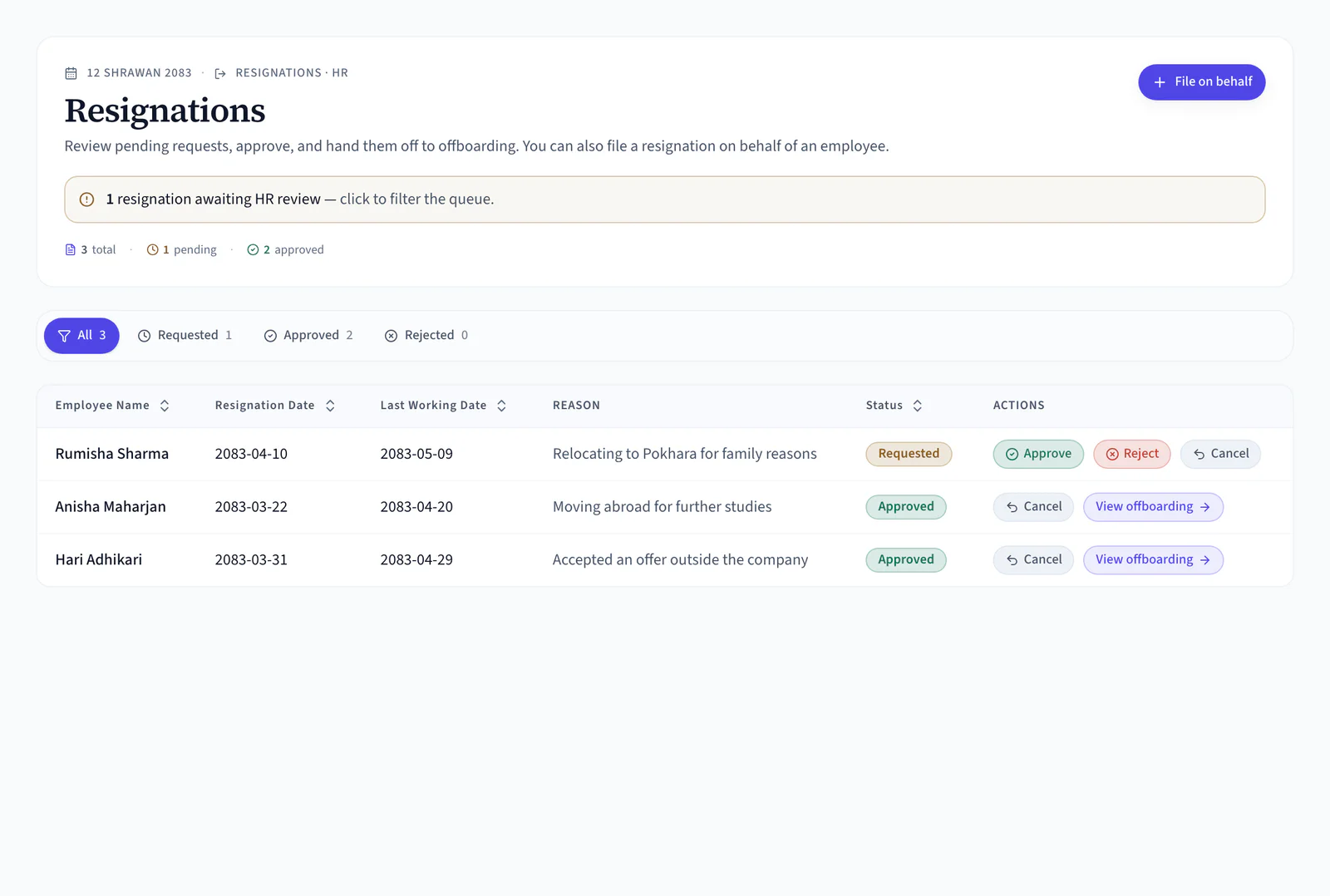
- Resignations reviewed and approved in one place, then handed off to offboarding automatically
- 9 exit clearance stages: notice period, manager clearance, IT asset return, access revocation, finance clearance, final settlement, exit interview, document handover, compliance approval
Everything From Offer Accepted to Exit Complete
The full hire-to-retire toolkit: onboarding connected to recruitment on one side, offboarding connected to payroll on the other.
Staged Onboarding Board
Five stages from Pre-Joining to First Month Training, each with its own task list and a live count of who sits there.
Ready-Made Template
Start with 20 proven tasks: welcome email, workspace, laptop, HRMS login, NDA, ID card, bank details, TDS/PAN.
Stage Tasks
Every task tracks To Do → Done, and overall completion updates as the checklist is worked through.
Custom Stages
Add, rename or reorder stages with + Stage to shape your company's own day 1 and day 30.
Recruitment Handoff
Hires from recruitment appear in onboarding automatically, or use Add Someone to enrol an existing employee.
New Joiners View
Everyone currently onboarding in one list, filterable by Not Started, In Progress, Completed, source and department.
Resignations Module
Employees resign in the app, or HR files on their behalf. Review, approve or reject, then hand off to offboarding.
Initiate Offboarding
Record resignation date, last working day, exit reason and notice period. Clearance starts immediately.
9-Stage Clearance
Notice Period, Manager Clearance, IT Asset Return, Access Revocation, Finance Clearance, Final Settlement, HR Exit Interview, Document Handover and Compliance Approval.
Last-Day Alerts
A banner warns when someone leaves within 7 days, so clearance finishes before the last day, not after.
Status at a Glance
Each leaver card shows Initiated and Last Day badges, and the header counts offboarding, in progress and completed.
Custom Exit Stages
Add company-specific clearance desks with + New Stage. The flow is yours to shape.
Every Employee Exit Follows a Clear Approval Process
Move each departing employee through manager approval, asset returns, access removal, finance clearance and final HR documentation, with a seven-day alert for anything still pending.
- Step 1
Notice Period
Resignation logged with dates, reason and notice days.
- Step 2
Manager Clearance
Handover complete and signed off by the reporting manager.
- Step 3
IT Asset Return
Laptop, accessories and company property checked back in.
- Step 4
Access Revocation
Email, HRMS, VPN and tool access switched off on time.
- Step 5
Finance Clearance
Advances, loans and dues reconciled by finance.
- Step 6
Final Settlement
Final pay, remaining leave and PF closed out correctly.
- Step 7
HR Exit Interview
A structured conversation logged before the goodbye.
- Done
Exit Completed
A clean exit: documented, settled and archived.
Set Up Onboarding and Offboarding in Four Clear Steps
Onboarding runs from the template forward; offboarding runs from the resignation back. Both are the same board, the same owners and the same live completion.
- Use the five ready-made stages and 20 tasks, from Pre-Joining to First Month Training, or add stages of your own.
- Move selected candidates over from recruitment, or add an existing employee straight into onboarding.
- Track welcome emails, documents, system access, ID cards, bank details and payroll information as each is done.
- See every new hire as Not Started, In Progress or Completed, filtered by department and source.
- Review and approve the request in the Resignations tab, then move the employee into offboarding.
- Record the resignation date, final working day, exit reason and notice period.
- Work through handovers, asset returns, access removal, finance clearance, final settlement and the exit interview.
- A seven-day warning fires while clearance tasks are still pending before the employee's final working day.
Five Stages, Twenty Tasks, Ready
The Exit Starts Here
One Process, Clear Duties for Different Teams
NepalHRM gives HR, managers, IT and finance the right tasks and the right visibility at each stage of onboarding and offboarding.
For HR Teams
Every hire and every exit on one board
- Stage and checklist templates you control
- Resignation review and offboarding setup
- Progress tracking for every hire and exit
For Managers & IT
Assigned tasks without the email chain
- Named tasks with due dates
- Shared progress updates
- Asset return tracked to the item
For Finance Teams
Dues cleared before the exit closes
- A dedicated Final Settlement stage
- Notice period records on file
- Dues and clearance tracked in one place
Onboarding & Offboarding Built for Every Business in Nepal
Hiring and exits get harder as teams grow. NepalHRM runs the same clean process for businesses of every size, from every industry.
Onboarding Connects Every Module
A joining checklist is not a standalone form. It pulls hires from recruitment, creates the employee record, hands out assets and closes with payroll's final settlement.
Recruitment & ATS
Selected candidates move straight from the hiring pipeline into onboarding, with no re-typing.
Employee Management
Completing onboarding builds the employee record: profile, department, reporting manager and documents.
Payroll Software
Bank details and TDS/PAN captured at joining feed payroll, and exits close with a final settlement.
Asset & Procurement
Laptops and phones handed out on day 1 are checked back in at the IT Asset Return clearance stage.
Leave Management
Leave policy and opening balances apply from the joining date, and unused leave settles at exit.
Mobile App
New joiners tick off their own checklist and employees file resignations from Android and iOS.
Training & LMS
Orientation, safety and policy courses become tasks on the joining checklist, so day one includes the training an audit later asks for.
Onboarding & Offboarding is one module of the all-in-one HR software for Nepal, so an employee is created once and every module above reads the same record.
Simple, Transparent Pricing
No Hidden Fees
NepalHRM gives you enterprise-grade HR software at a price built for Nepali businesses of every size.
- All core HR modules
- Nepal payroll compliance
- PF, SSF, CIT & eTDS
- Biometric integration
- Free onboarding support
- Regular feature updates
- Multi-company support
- BS + AD calendar
Free trial available, no card required · No setup fees · Cancel anytime
Access NepalHRM from the Web, Android and iOS
Manage onboarding from the desk, approve resignations from mobile, and let new joiners tick off their own checklist anytime.
Frequently Asked Questions
Everything you need to know about onboarding & offboarding in NepalHRM before you get started.
No. NepalHRM ships with a template: 5 stages and 20 tasks covering Pre-Joining, Day 1 Account Setup, Day 1 Policy Signing, First Week and First Month Training. Use it as it is, or reshape it with + Stage.
Yes. New hires from the recruitment pipeline appear automatically, and Add Someone enrols any existing employee, which is useful for transfers, rehires or opening a new branch.
The New Joiners view lists everyone being onboarded with counts for Active, Not Started, In Progress and Completed, filterable by source and department.
Employees file resignations in the app, or HR files on their behalf. Once the request is reviewed and approved in the Resignations tab it hands off to offboarding, or HR can click Initiate Offboarding directly.
Thirteen stages walk each leaver past every desk: Notice Period, Manager Clearance, IT Asset Return, Access Revocation, Finance Clearance, Final Settlement, HR Exit Interview and more. Add your own with + New Stage.
A warning banner appears when someone leaves within 7 days with clearance still open, so assets, access and dues are closed before the last working day rather than after it.
Joining and exit terms, defined
The two ends of the employment lifecycle, and the statutory steps each one owes.
- Employee Onboardingकर्मचारी भर्ना प्रक्रियाOnboarding is everything between an accepted offer and a new employee being productive: paperwork, identifiers, access, equipment, introductions and the first pieces of work. It is a process with owners and dates, not a first-day checklist.
- Probation Periodपरीक्षणकालProbation is the initial period during which an employer assesses a new employee before confirming them. Nepal's Labour Act 2074 caps it at six months, after which the employee is confirmed or the engagement ends.
- Notice Periodसूचना अवधिA notice period is the time between notifying the other party that employment will end and the last working day. In Nepal the requirement depends on the ground for ending the engagement and on what the contract says.
- Offboardingबहिर्गमन प्रक्रियाOffboarding is the process of ending employment properly: handover, asset recovery, access revocation, clearance from each department, the exit conversation, and the final settlement.
- Full and Final Settlementअन्तिम हिसाबFull and final settlement is the closing calculation when an employee leaves: salary for days worked, leave encashment, any dues owed to them, less any recoveries, paid once every clearance is complete.
All HR and payroll terms used in Nepal are defined in the glossary, each with the Act or rate it comes from.
Give Every First Day a Plan and Every Last Day a Checklist
Stop improvising day one and chasing laptops after the exit. Run hiring and exits from one connected HR system built for Nepali companies.
- No credit card
- Free onboarding
- Set up in one day
- Cancel anytime