ZKTeco & Hikvision Attendance Management Software
Works with ZKTeco and Hikvision devices. Punches sync into one attendance record per employee, on Essential and above, and flow into payroll on Business and Enterprise.
- ZKTeco push or edge agent
- Hikvision push
- Sintech (Realand) cloud push
How does ZKTeco attendance management software work?
The device records the punch and the software turns it into a working day. A ZKTeco, Hikvision or Sintech (Realand) machine that can push sends each punch to NepalHRM over the internet. An older ZKTeco machine that cannot push is read by the NepalHRM edge agent, a small service on a computer on the same office network. Either way, each punch carries the device's own user ID, which HR maps once to an employee, so it lands in that person's attendance record and the day is built from your attendance policy.
- Works with ZKTeco, Hikvision and Sintech (Realand) devices. Older ZKTeco machines that cannot push connect through the NepalHRM edge agent on your office network.
- A device that pushes needs no office computer and no port opened on your router.
- The edge agent stores every punch before uploading it, so an internet outage delays attendance instead of losing it.
- Biometric devices are on Essential and above, and approved attendance flows into payroll on Business and Enterprise.
Last updated · Reviewed by Rajendra Regmi, Co-founder
What connects, and how
- 3 makes
- ZKTeco, Hikvision and Sintech (Realand)
- Push
- No office computer needed for devices that push
- Buffered
- The edge agent keeps punches through an outage
- Essential+
- Biometric devices; payroll on Business and Enterprise
You Already Own the Machine. The Month Is Still in Excel
Most offices bought the fingerprint or face reader years ago and read it from one desktop program. The punches are on the device; turning them into a payable month is still an export and a spreadsheet.
- Punches exported by hand, then matched to employee names one row at a time
- Each branch's machine is an island, read only when somebody visits it
- A device user ID nobody mapped, so a month of punches belongs to no one
- The internet drops, and nobody knows which punches made it
Keep the Device. Connect It Properly.
NepalHRM takes punches straight from the machine you already have: by push where the device supports it, through the edge agent where it does not, and files each one against the right employee.
What NepalHRM gives you
- ZKTeco machines push over ADMS, each with its own token in the server address
- Hikvision terminals post every event to an address generated for that device
- Sintech (Realand) terminals push each punch to the NepalHRM cloud
- Older ZKTeco machines that cannot push connect through the NepalHRM edge agent on your office network
Every Way a Device Reaches NepalHRM
Pick the mode by what the machine can do. A device that can push needs nothing else in the office; a ZKTeco machine that cannot is read by the edge agent.
ZKTeco ADMS Push
The machine's Cloud Server (ADMS) setting points at an address NepalHRM generates for that device, with its own token in it. Once set, a push without the token is refused.
ZKTeco Relay Mode
For a machine that can only send plain HTTP, pushes go through a NepalHRM relay that signs each one, accepted only from the office IP addresses listed for that device.
Hikvision Push
The terminal's HTTP Listening setting takes a path NepalHRM generates per device, and each access event is posted as it happens. A test link proves the address first.
Sintech (Realand) Cloud Push
Sintech terminals send each punch to the NepalHRM cloud listener. The device is matched by its MAC address and accepted only from your office's public IP.
Edge Agent for Older ZKTeco
A small service on a Windows, macOS or Linux computer on the office network reads ZKTeco machines that cannot push and uploads their punches in signed batches.
Stored Before It Is Sent
The agent writes every punch to the office computer before uploading it, then sends the backlog when the connection returns. An outage delays attendance; it does not lose it.
Sync Now and Backfill
From the Edge Agents tab, HR pulls a machine on demand or backfills a date range, as far back as the device's own memory still holds.
Device User to Employee
Map each device user ID to an employee by hand, by auto-matching on name, or in bulk. Punches recorded before the mapping are attached once it exists.
One Fleet Board
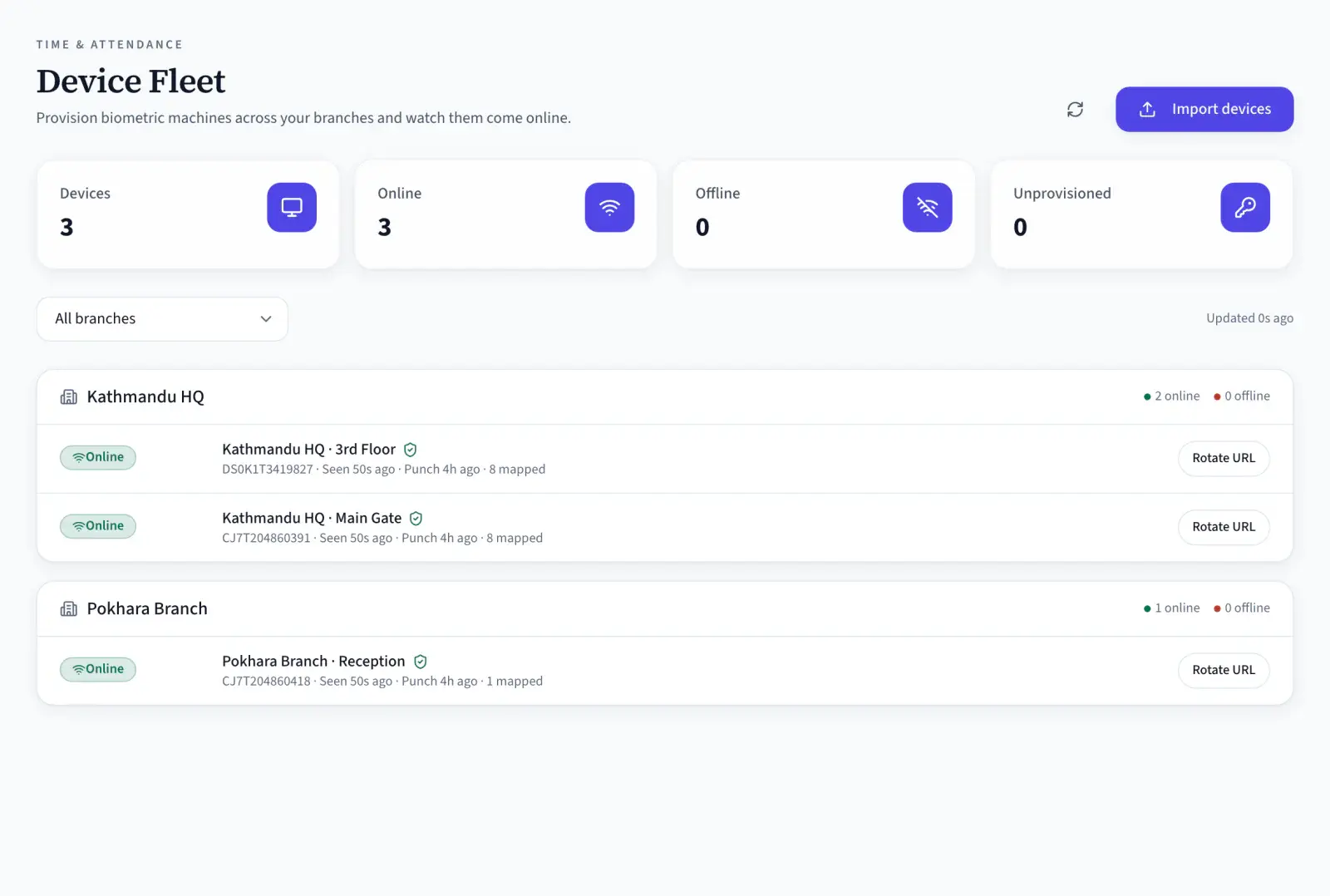
Every device by branch with its online status, when it was last seen, its last punch and how many employees are mapped, plus the devices not yet provisioned.
Setting a machine up, or chasing missing punches? Check your device and its connection mode: what to set on it, and what to look at when punches go missing.
From the Reader at the Door to the Attendance Record
Four steps every punch takes, whichever device it came from. Only the second one differs between push and the edge agent.
- 08:58 AM
Punched
The employee presents a finger or face, and the device stores the punch with its own user ID and time.
- Push or agent
Delivered
A push device sends it to NepalHRM; behind the edge agent it is read over the office network, stored locally and uploaded.
- User ID mapped
Attributed
The device user ID is matched to the employee it was mapped to, and the punch joins that person's raw log.
- Rules applied
Recorded
The day is built from the punches under your attendance policy. On Business and Enterprise, approved days flow into payroll.
Connect a Device in Four Steps
Which track you follow depends on whether the machine can push. Both end in the same attendance record.
- Create it in NepalHRM under its branch, with its vendor and the serial number from the machine. A Sintech terminal is identified by its MAC address instead.
- NepalHRM generates the address for a ZKTeco machine (its Cloud Server or ADMS settings) and a Hikvision terminal (HTTP Listening). A Sintech terminal takes the NepalHRM listener in its server and port fields.
- The device turns Online on the fleet board after its first push, and the raw punch log shows each event with its device, user ID, time and direction.
- Pair each device user ID with an employee by hand, by auto-matching on name, or in bulk. Punches recorded before the mapping are attached once it exists.
- In Edge Agents, create an agent for the branch and download it. NepalHRM shows the agent's secret key once, so copy it then.
- Run the setup on a Windows, macOS or Linux computer on the same network as the machine. It installs as a background service, so keep that computer on and stop it sleeping.
- Give the agent the machine's IP address and serial number. The serial has to match the device registered in NepalHRM, and only one agent should read each machine.
- Punches then arrive on their own. Sync now and Backfill pull on demand, and device users are mapped to employees the same way as for push.
One Board for Every Branch
The Edge Agent on Your Office Network
Who Touches the Device, and What They Get
The office admin sets it up once, HR keeps the mappings right, and payroll reads days rather than raw punches.
For the Office Admin
Set it up once
- One server address per device, generated by NepalHRM
- No port to open on the router for a device that pushes
- An edge agent only where a ZKTeco machine cannot push
For HR
Every punch on the right person
- Map device user IDs once, by hand, by name or in bulk
- Every device's status and last punch on one board
- Punches from before a mapping attached once it exists
For Payroll
Days, not raw punches
- Approved days, absences and half days per employee
- Flow into the payroll draft on Business and Enterprise
- No device export to retype at month end
A Reader at the Door, in Every Kind of Workplace
Factory gates, branch counters, hospital wards and office receptions connect the same way: push where the device can, the edge agent where it cannot.
Device Punches Feed the Rest of HR
Connecting the device is the first step. These are the modules that read what it sends.
Attendance
Policies, late marks, regularization and the monthly matrix, all built from these punches.
Shift & Overtime
Shift start and grace decide lateness, and hours past the threshold become overtime.
Payroll Software
On Business and Enterprise, approved days become payable days on the salary sheet.
Employee Management
Device user IDs map to these employee profiles, so every punch lands on the right record.
Leave Management
Approved leave owns the day, so a leave day is never counted as an absence.
Mobile App
Staff at a site with no device clock in from the phone, into the same attendance record.
Biometric device sync is one module of the all-in-one HR software for Nepal, so an employee is created once and every module above reads the same record.
Simple, Transparent Pricing
No Hidden Fees
NepalHRM gives you enterprise-grade HR software at a price built for Nepali businesses of every size.
- All core HR modules
- Nepal payroll compliance
- PF, SSF, CIT & eTDS
- Biometric integration
- Free onboarding support
- Regular feature updates
- Multi-company support
- BS + AD calendar
Free trial available, no card required · No setup fees · Cancel anytime
Check Attendance from the Web, Android and iOS
Devices, agents and mappings are managed in the web app. Employees check their own attendance from the mobile app whenever they want.
Frequently Asked Questions
Everything you need to know about biometric device sync in NepalHRM before you get started.
Works with ZKTeco, Hikvision and Sintech (Realand) devices. Older ZKTeco machines that cannot push connect through the NepalHRM edge agent on your office network. If you are not sure what your machine supports, book a demo and bring its make; we will tell you which mode it uses.
With push, the device itself sends each punch to NepalHRM over the internet, so no office computer is involved. The edge agent is a small service on an office computer that reads punches from ZKTeco machines over the local network and uploads them. Use push where the device supports it, and the agent for older ZKTeco machines that cannot push.
For push, the server address. On a ZKTeco machine it goes in the Cloud Server (ADMS) settings and on a Hikvision terminal in HTTP Listening; NepalHRM generates the value for each device. A Sintech terminal takes the NepalHRM listener in its server and port fields. Also check the device's date, time and time zone, because every punch carries the device's own clock.
Behind the edge agent, every punch is stored on the office computer before it is uploaded, and the backlog is sent when the connection returns. A ZKTeco machine on push keeps the punches it could not send and delivers them when it reconnects. A Hikvision terminal on push sends each event as it happens and does not resend one that failed, so check its last-seen time on the fleet board after an outage.
Every device keeps its own user IDs. In NepalHRM you map each device user ID to an employee once: by hand, by auto-matching on name, or in bulk. Punches recorded before the mapping existed are attached to that employee as soon as it is made.
Not for a device that pushes: it connects out to NepalHRM, and NepalHRM never connects in. The edge agent also only connects out. The agent does need to reach the machine on your local network, and only one agent should read each machine.
Yes. One agent reads every machine listed in its settings on the same office network, so a branch needs one agent, not one per device. A branch whose devices all push needs no agent at all.
Biometric devices are on Essential and above. Punches sync into one attendance record per employee on each of those plans, and approved attendance flows into payroll on Business and Enterprise.
Bring the Machine You Already Own
Book a demo and tell us the make on your wall. We will show which connection mode it uses and a month of punches becoming attendance, before you change anything.
- No credit card
- Free onboarding
- Set up in one day
- Cancel anytime