

Employee records support almost every HR decision. HR teams use them to process salaries, assign leave, track attendance, manage documents, confirm reporting lines, and respond to employee requests. When employee details stay incomplete or scattered, even simple HR work can slow down.
A well-set employee profile gives your team one clear place to store personal details, job information, payroll data, documents, emergency contacts, assets, and work history. With the right structure, HR can manage people without checking separate files, emails, spreadsheets, or message threads.
Table of Contents
- What Is an Employee Profile?
- Employee Profile vs Employee Database
- Why Is an Employee Profile Important?
- Keeps Employee Details Organized
- Supports Payroll and Attendance
- Makes Onboarding Easier
- Improves Approvals and Reporting Lines
- Helps With Reviews, Audits, and Exits
- Essential Fields to Include in an Employee Profile
- Employee Profile Setup Checklist
- How to Set Up an Employee Profile?
- Step 1: Collect Basic Employee Details
- Step 2: Add Job and Department Information
- Step 3: Enter Payroll and Bank Details
- Step 4: Upload Required Documents
- Step 5: Set Attendance, Leave, and Shift Rules
- Step 6: Add Assets and System Access
- Step 7: Review the Profile Before Use
- Step 8: Update the Profile When Details Change
- Ready-to-Use Employee Profile Template
- Other Employee Profile Templates HR Can Use
- Who Can Access an Employee Profile?
- Common Mistakes to Avoid When Creating Employee Profiles
- Collecting Too Much Data
- Missing Payroll and Tax Details
- Using Outdated Employee Information
- Storing Documents in Several Places
- Giving Too Much Access
- Skipping Change History
- Best Practices for Managing Employee Profiles
- Use the Same Format for Every Employee
- Update Profiles After Every Approved Change
- Keep Documents Linked to the Right Profile
- Limit Access to Sensitive Information
- Let Employees Request Basic Updates
- Review Profiles at Key Moments
- Keep Profile Changes Traceable
- Conclusion
What Is an Employee Profile?
An employee profile is a structured record that keeps all important details about one employee in one place. It includes basic identity details, contact information, job role, department, reporting manager, payroll setup, attendance rules, leave details, documents, assets, and employment history.
A good employee profile is more than a digital form. It helps HR understand who the employee is, where they work, how their salary should be processed, what documents are complete, and what changes have happened during their time with the company.
Employee Profile vs Employee Database
An employee profile is the individual record of one employee. An employee database is the full collection of all employee profiles in the company. Think of the profile as one person's complete HR file and the database as the full employee record system. An employee profile contains the complete record of one employee, while an employee database brings all employee profiles together in one structured system.
This difference matters because HR should build every profile in the same format. When each profile follows the same structure, the full database becomes easier to search, update, protect, and use for payroll, attendance, leave, reports, and exits.
Why Is an Employee Profile Important?
An employee profile gives HR the right information before making decisions about salary, leave, attendance, role changes, documents, and employee requests. Complete profiles reduce repeated follow-ups and help different teams work from the same updated details.
Keeps Employee Details Organized
A profile keeps personal details, job information, documents, emergency contacts, and work history in one place. HR can find the right detail quickly instead of checking old folders, emails, or spreadsheets.
Supports Payroll and Attendance
Payroll and attendance depend on accurate employee details. Salary structure, bank information, PAN details, shift rules, biometric ID, leave policy, and tax category should all connect with the correct employee profile.
Makes Onboarding Easier
A clear profile helps HR collect the right details when a new employee joins. Documents, bank details, emergency contacts, reporting manager, assets, and access needs can be added from the start.
Improves Approvals and Reporting Lines
Managers need correct reporting lines to approve leave, review attendance, assign work, and support employees. Updated profile details reduce confusion when employees move between teams or roles.
Helps With Reviews, Audits, and Exits
Contracts, identity documents, salary changes, warnings, appraisals, assets, and exit records should be easy to find. A complete profile gives HR a reliable record during internal reviews, audits, and offboarding.
Essential Fields to Include in an Employee Profile
Essential employee profile fields should show who the employee is, where they work, how they get paid, who manages them, what documents are complete, and which HR rules apply to them. The exact field list can vary by company, but the structure below covers the main details most HR teams need.
Category | Fields to include |
Personal details | Full legal name, date of birth, gender where required, nationality, citizenship or identity number, current address, permanent address, personal phone number, personal email, emergency contact. |
Job information | Employee ID, job title, designation, department, team, reporting manager, employment type, joining date, probation status, work location, branch, work arrangement. |
Payroll and bank details | Salary structure, basic salary, allowances, PAN details, bank name, account number, tax category, SSF/PF/CIT setup, payroll group, pay cycle, deduction details. |
Attendance and leave setup | Shift, working days, weekly off, holiday group, attendance method, biometric or device ID, mobile attendance setup, leave policy, leave balance, overtime eligibility. |
Documents | Citizenship or identity copy, PAN document, signed appointment letter or contract, academic certificates, experience letters, policy acknowledgement, role-specific licenses, training certificates. |
Assets and access | Laptop, phone, ID card, access card, uniform, vehicle, email account, software access, permission level, issued date, return status. |
Performance and history | Goals, KPIs, review history, promotion history, transfer history, training records, disciplinary records, salary history, exit details. |
Optional safety and support details | Blood group, medical note, allergy note, accommodation requirement, preferred language. Collect these only when needed, with clear purpose and proper privacy controls. |
Employee Profile Setup Checklist
HR can use the following checklist before marking an employee profile as complete. The goal is not to collect unnecessary data, but to make sure the profile supports real HR work from the first day.
Checklist Area | What HR should confirm |
Identity and contact | Name, contact details, address, identity number, emergency contact, photo if required. |
Job setup | Employee ID, department, designation, manager, employment type, joining date, probation details, work location. |
Payroll setup | Salary structure, bank details, PAN, tax category, SSF/PF/CIT settings, pay group, deduction setup. |
Attendance and leave | Shift, weekly off, leave policy, holiday group, attendance method, biometric ID, overtime eligibility. |
Documents | Contract, identity proof, PAN document, certificates, experience letters, policy acknowledgments, role-specific files. |
Assets and access | Laptop, ID card, software access, email account, device access, permission level, handover records. |
Review before activation | Please check for missing fields, duplicate profiles, incorrect managers, incorrect bank details, missing documents, and access level. |
How to Set Up an Employee Profile?
To set up an employee profile, collect the employee's personal details, job role, payroll details, bank information, attendance rules, leave policy, documents, assets, and access permissions. Then review the profile before activation and update it whenever employee details change.
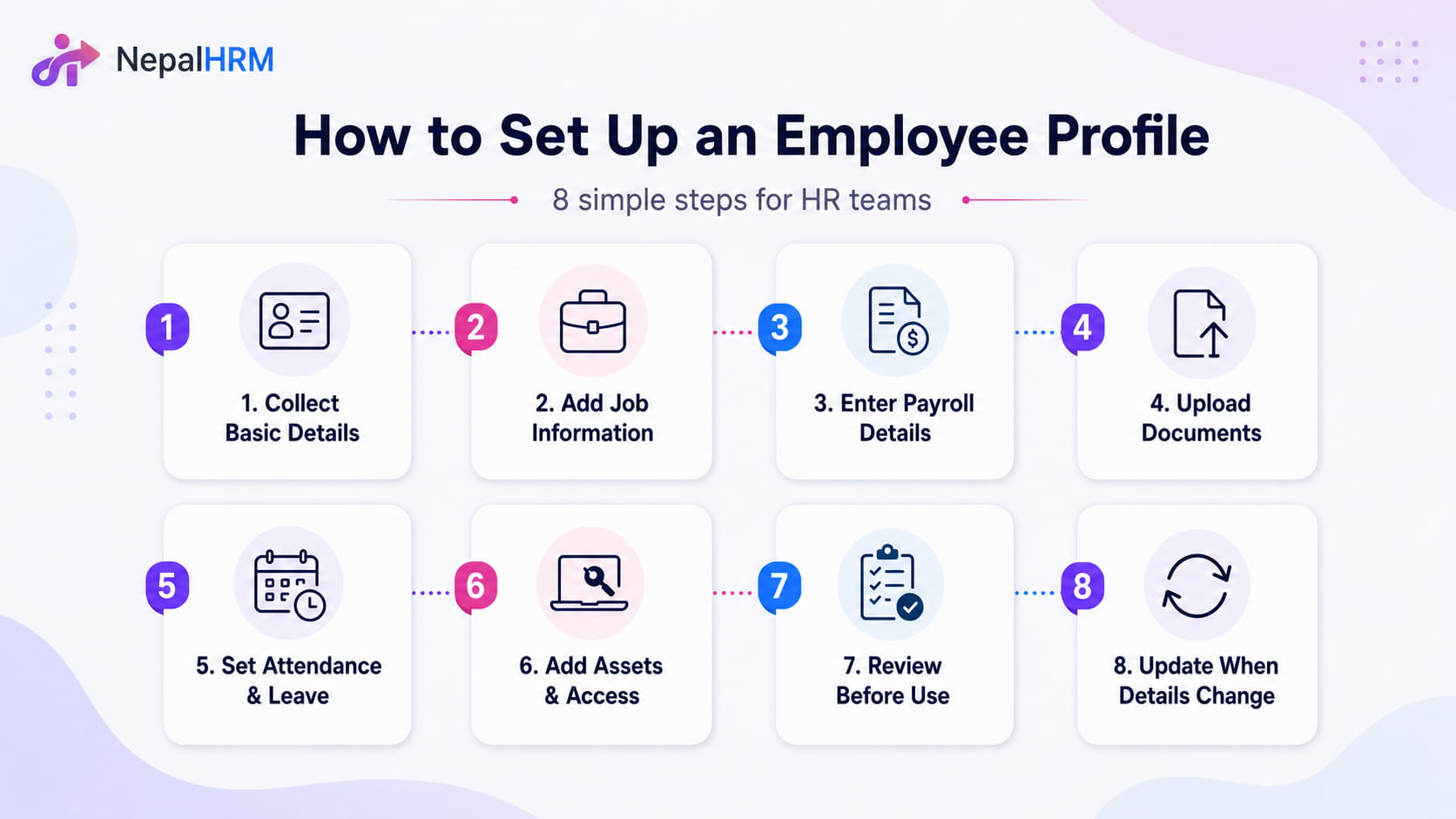
Step 1: Collect Basic Employee Details
Start with full name, contact number, email address, current address, permanent address, identity details, photo if needed, and emergency contact. These details help HR identify the employee correctly and reach the right person during urgent situations.
Step 2: Add Job and Department Information
Add the employee ID, designation, department, joining date, employment type, work location, probation details, and reporting manager. This shows where the employee fits in your company and who approves their work-related requests.
Step 3: Enter Payroll and Bank Details
Add salary structure, bank account details, PAN number, tax category, SSF, PF, CIT, pay group, and approved deductions. Finance needs these details to process salary, payslips, taxes, and reports correctly.
Step 4: Upload Required Documents
Upload documents such as a citizenship copy, PAN details, employment contract, appointment letter, certificates, CV, experience letters, and policy acknowledgments. Keeping documents inside the profile reduces missing files during audits, reviews, or exits.
Step 5: Set Attendance, Leave, and Shift Rules
Assign the employee's shift, working days, weekly off, holiday group, leave policy, attendance method, and biometric or mobile attendance ID. These details help HR track attendance, leave balances, late arrivals, overtime, and monthly payroll adjustments.
Step 6: Add Assets and System Access
Record company items and digital access given to the employee, such as laptop, phone, ID card, access card, email account, HRMS login, and software permissions. These records help during transfers, replacements, and offboarding.
Step 7: Review the Profile Before Use
Check whether the profile has duplicate entries, wrong spelling, missing bank details, incorrect manager, incomplete documents, or unnecessary access. A quick review before activation prevents many future HR and payroll issues.
Step 8: Update the Profile When Details Change
Employee details can change after joining. HR should update the profile after salary revisions, promotions, transfers, address changes, bank updates, manager changes, document renewals, and exit decisions.
Ready-to-Use Employee Profile Template
A standard employee profile template helps HR collect the same important details for every employee. Use this template as a base, then add or remove fields based on company policy, job role, and legal or payroll needs.
Profile Section | Fields |
Employee identity | Full name, employee ID, photo, citizenship/identity number, date of birth, nationality, personal phone, personal email, current address, permanent address. |
Emergency details | Emergency contact name, relationship, phone number, alternate contact, optional blood group or medical note if company policy requires it. |
Work details | Department, designation, job title, reporting manager, employment type, work location, joining date, probation end date, status. |
Payroll details | PAN number, salary structure, basic salary, allowances, bank name, bank account number, tax category, SSF/PF/CIT status, payroll group. |
Attendance and leave | Shift, weekly off, attendance method, biometric/device ID, leave policy, opening leave balance, overtime eligibility, holiday group. |
Documents | Contract, appointment letter, PAN document, identity copy, certificates, experience letters, policy acknowledgment, licenses, insurance nomination if applicable. |
Assets and access | Laptop, phone, ID card, access card, email account, software accounts, permission level, issue date, return status. |
Work history | Salary changes, promotions, transfers, appraisals, warnings, training records, resignation date, final settlement, exit clearance. |
Other Employee Profile Templates HR Can Use
Not every employee profile is used for the same purpose. HR can keep one detailed internal profile and create lighter versions for directories, bio pages, performance reviews, or management reports.
Template Type | Useful Fields |
Basic employee profile | Name, employee ID, job title, department, manager, joining date, employment type, work location, work email, phone number. |
Internal HR profile | Full personal details, emergency contact, job information, payroll setup, documents, attendance rules, leave setup, assets, access permissions, and work history. |
Company directory profile | Name, photo, job title, department, work email, phone extension, location, manager, short role summary, expertise, languages, teams involved. |
Employee bio profile | Name, role, department, professional bio, experience, skills, education, certifications, achievements, and professional photo. |
Performance profile | Role overview, goals, KPIs, review period, achievements, strengths, improvement areas, training needs, manager comments, employee comments. |
Who Can Access an Employee Profile?
Not everyone in the company should see every detail inside an employee profile. Role-based access gives each person the information they need while protecting private details such as salary, bank information, identity documents, and HR notes.
Role | Recommended Access |
HR administrators | Full profile access to create, update, verify, and manage employee records, documents, attendance setup, leave rules, salary details, and status changes. |
Department managers | Team-level access to job information, attendance, leave, goals, and performance details. Sensitive salary or document access should depend on company policy. |
Employees | Self-service access to view their own details, attendance, leave, payslips, documents, and basic update requests. HR should verify sensitive changes. |
Finance team | Access to payroll-related details such as salary structure, PAN, bank details, deductions, payslips, and payroll reports. |
Senior management | Summary-level access for workforce planning, salary review, department structure, compliance checks, and decision-making. |
IT or system admin | Access to system fields such as email accounts, software access, devices, and permission setup. Personal and salary details should stay restricted unless approved. |
Common Mistakes to Avoid When Creating Employee Profiles
Employee profiles become hard to use when HR collects too much data, misses important payroll fields, uses inconsistent formats, or stores documents in multiple places. Avoiding these mistakes keeps employee records cleaner and easier to trust.
Collecting Too Much Data
Extra fields make profiles longer, harder to update, and uncomfortable for employees. Collect only information that supports HR work, payroll, compliance, safety, employee support, or company records.
Missing Payroll and Tax Details
A profile becomes incomplete when bank details, PAN, salary structure, SSF, PF, CIT, tax category, or pay group is missing. These fields directly affect payslips, deductions, and salary reports.
Using Outdated Employee Information
Address, phone number, bank account, role, department, salary, and reporting manager can change after joining. Old details can create approval delays, payroll errors, and wrong reports.
Storing Documents in Several Places
Employee documents often get lost when HR stores them across emails, folders, chat apps, and spreadsheets. Link documents to the right profile so HR can find them during onboarding, reviews, audits, and exits.
Giving Too Much Access
Employee profiles contain private information. Wide access can create privacy concerns and accidental changes. Give access based on role and review permissions regularly.
Skipping Change History
HR should know who changed a profile, what changed, and when. A clear change history helps teams review salary updates, manager changes, document uploads, and other sensitive edits.
Best Practices for Managing Employee Profiles
Good profile management keeps employee data useful after onboarding. HR should follow a standard format, update records on time, protect sensitive fields, and review profiles at key employee milestones.
Use the Same Format for Every Employee
A standard profile format helps HR collect the same important details for every employee. It also makes handovers, reviews, audits, and reports easier.
Update Profiles After Every Approved Change
Salary revisions, promotions, transfers, manager changes, address updates, bank updates, and exits should reflect in the profile as soon as acknowledgments.
Keep Documents Linked to the Right Profile
Contracts, identity copies, PAN details, certificates, payslips, warning letters, and policy acknowledgements should stay under the correct employee profile.
Limit Access to Sensitive Information
Give each user only the access needed for their work. HR, finance, managers, employees, and admins should have different permissions.
Let Employees Request Basic Updates
Employees should be able to request updates for phone number, address, emergency contact, and bank information. HR can verify the change before final approval.
Review Profiles at Key Moments
Review profiles during onboarding, probation confirmation, salary revision, transfer, performance review, and exit. A scheduled review prevents small errors from becoming bigger problems.
Keep Profile Changes Traceable
A clear audit trail helps HR review updates, correct mistakes, and protect sensitive employee records.
Conclusion
A complete employee profile gives HR a clear picture of each employee from joining to exit. When personal details, job information, payroll data, documents, emergency contacts, assets, and work history stay updated in one profile, HR can manage daily work with fewer errors.
Start with useful fields, keep the profile format consistent, protect sensitive information, and update records whenever employee details change. NepalHRM helps HR teams build clean, searchable, and secure employee profiles so teams can manage people, pay, documents, and approvals with less manual work. Sign up today!!


