
HR problems usually start small. One missing employee record, one wrong attendance entry, one leave request approved over chat, or one salary detail left unchecked may not look serious at first.
As a company grows, these small gaps turn into repeated work for HR, finance, managers, and employees. A missed update can create an incorrect payslip, a lost leave approval can create a balance dispute, and an outdated employee file can slow reporting.
An HRMS, or Human Resource Management System, helps businesses manage employee records, attendance, leave, payroll, reports, hiring, and workflows in one organized system. For businesses in Nepal, the right HRMS should also support local payroll needs such as PF, CIT, SSF, eTDS, salary sheets, and payslips.
Table of Contents
- What Is HRMS?
- Why Does HR Work Get Harder as Teams Grow?
- HR Problems and How HRMS Solves Them at a Glance
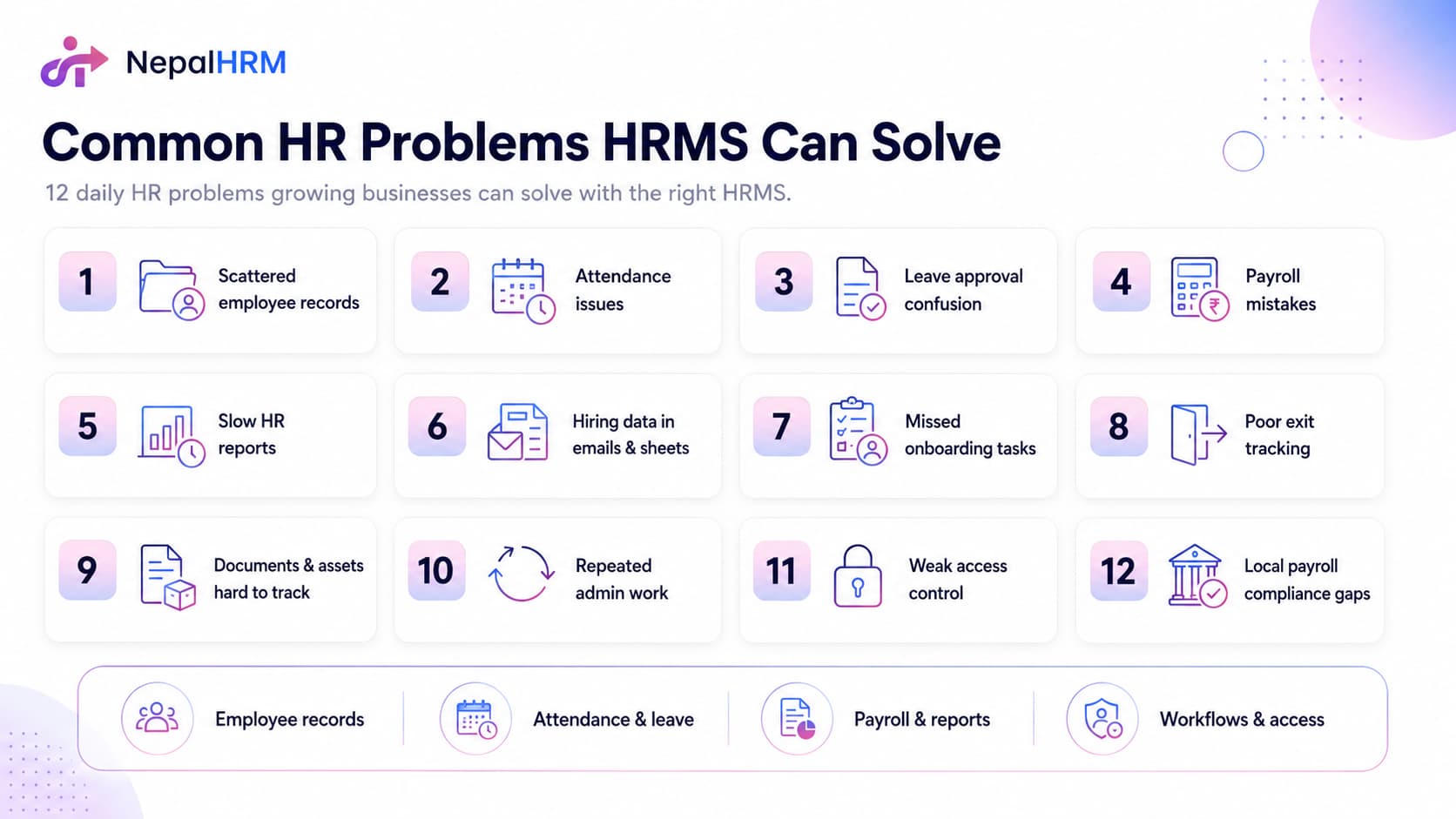
- Common HR Problems HRMS Can Solve
- 1. Employee Data Stored in Too Many Places
- 2. Attendance Records That Are Hard to Verify
- 3. Leave Requests Without a Clear Approval Trail
- 4. Payroll Errors From Manual Salary Work
- 5. HR Reports That Take Too Long to Prepare
- 6. Hiring Data Spread Across Emails and Spreadsheets
- 7. Onboarding Tasks That Are Easy to Miss
- 8. Exit Processes Without Proper Tracking
- 9. Documents and Assets That Are Hard to Track
- 10. Repeated Admin Work That Slows HR Teams Down
- 11. Sensitive Data Without Proper Access Control
- 12. Local Payroll Records That Are Hard to Match
- How HRMS Brings Daily HR Work Into One System
- HR Problems Nepali Businesses Face More Often
- What to Check Before Choosing an HRMS?
- Why NepalHRM Fits Nepali Businesses?
- Final Thoughts
What Is HRMS?
HRMS means Human Resource Management System. HRMS software helps companies store employee records, manage attendance and leave, process salary information, track documents, support hiring, prepare reports, and organize employee workflows from one platform.
The main goal of an HRMS is not only to digitize HR files. A good HRMS gives HR teams a reliable way to complete daily work, reduce manual follow-ups, and keep employee data updated as the company grows.
Why Does HR Work Get Harder as Teams Grow?
Manual HR work can hold up for a very small team. Five or ten employees, one shared spreadsheet, and leave approvals over the phone may feel manageable, even if the process is not ideal.
The problems start when teams grow. HR has to manage more records, more approvals, more documents, more salary changes, more attendance exceptions, and more monthly reports with the same spreadsheets, chats, and folders.
The issue is not weak HR management. The issue is that manual systems do not scale. Without a central system, HR teams spend more time searching, checking, and correcting than actually managing people.
HR Problems and How HRMS Solves Them at a Glance
Most HR problems come from disconnected records, unclear workflows, and too much manual checking. A quick problem-to-solution map helps you see where an HRMS can reduce daily workload.
HR Problem | How HRMS Helps |
Scattered employee records | Keeps personal details, job history, documents, and salary-related records in one employee profile. |
Manual attendance checks | Connects clock-in, clock-out, biometric punches, shifts, and daily summaries with employee records. |
Unclear leave approvals | Gives employees, managers, and HR a clear request, approval, rejection, and balance history. |
Payroll mistakes | Uses updated records, attendance, leave, salary structures, and deductions during salary processing. |
Slow HR reports | Lets HR filter, review, and export attendance, leave, salary, employee, and department reports faster. |
Repeated employee questions | Gives employees self-service access to leave balances, payslips, personal records, and requests. |
Common HR Problems HRMS Can Solve
Many HR problems come from manual updates, unclear approvals, and disconnected tools. When HR teams use too many files and channels, simple tasks like checking attendance, approving leave, processing salary, or finding a document take longer than they should.
An HRMS gives HR teams one organized place to manage people, records, approvals, salary data, reports, and employee workflows.
1. Employee Data Stored in Too Many Places
Employee records become hard to manage when personal details, job history, documents, and salary data live across different files. Basic information may sit in one spreadsheet, salary data in another, and key documents in an email thread from months ago.
A central employee profile keeps personal details, work information, documents, salary history, emergency contacts, and related records together. HR can work from current data instead of checking old sheets, paper files, and email attachments before every payroll run, report, or employee request.
2. Attendance Records That Are Hard to Verify
Attendance becomes unreliable when companies use paper registers, Excel sheets, or biometric devices that do not connect with employee records. The device may capture punches, but someone still has to export the data, clean it, and match it with salary records manually.
Connected attendance tracking helps HR manage clock-ins, clock-outs, late arrivals, shifts, biometric punches, and daily summaries without a separate export step. When attendance links with employee records and salary processing, data stays more consistent, and HR has less to check manually before payroll.
3. Leave Requests Without a Clear Approval Trail
Leave disputes often start because the request was never properly recorded. An employee messages a manager, the manager says yes, and HR does not receive the update. Leave balances can go wrong, HR may not know who is off, and salary deductions can become confusing later.
Digital leave workflows give employees a clear place to submit requests and give managers a structured way to approve or reject them. HR can see every request, decision, balance, and status from one screen without chasing confirmations across WhatsApp, calls, or email threads.
4. Payroll Errors From Manual Salary Work
Manual payroll is slow because salary calculation depends on many moving details. Attendance data, leave deductions, salary revisions, advance repayments, new joiners, and exit settlements all affect the final amount. When these details live in separate files, one missed update can create a wrong payslip.
Payroll-connected HR software brings employee records, attendance, leave, salary structures, deductions, and payslip generation into the same workflow. Salary processing becomes easier to review because the system uses updated records instead of old spreadsheets that may not reflect the latest changes.
5. HR Reports That Take Too Long to Prepare
HR reports take too long when data sits in separate files. Attendance may be in one sheet, leave in another, salary totals in a finance file, and employee details in a separate folder. HR then spends more time collecting and checking data than actually using the report.
Centralized HR data makes reports easier to prepare. Attendance summaries, leave records, salary sheets, employee reports, and department-wise data can be filtered, reviewed, and exported without rebuilding everything from scratch before every meeting.
6. Hiring Data Spread Across Emails and Spreadsheets
Recruitment looks manageable at first. A job goes out, CVs arrive, and interviews get scheduled. But candidate details stay across inboxes, spreadsheets, notebooks, and chat messages. Strong candidates can get missed, and past interview history can disappear.
Recruitment tools inside HR software help teams track job openings, candidates, interview stages, notes, activities, and final decisions together. Structured hiring records make follow-ups easier, candidate comparison clearer, and past applicant history easier to reuse when a similar role opens again.
7. Onboarding Tasks That Are Easy to Miss
New employees need documents, system access, training steps, team introductions, and clear first-day guidance. Without proper onboarding, HR may miss important tasks, and new hires may spend their first few days waiting for things that should already be ready.
Structured onboarding gives HR teams stages, task lists, due dates, and progress tracking. Each new hire can follow a clear joining path, while HR can see what is complete, what is pending, and who needs to take the next action.
8. Exit Processes Without Proper Tracking
Employee exits need careful handling because HR has to manage notice periods, asset returns, final settlement, handover, documents, and exit records at the same time. Without proper tracking, a laptop may not return on time, settlement may get delayed, and handover details may stay unclear.
Offboarding workflows help HR track each exit step from resignation to final settlement. Teams can assign tasks, follow up on pending items, and keep clear records before the employee leaves.
9. Documents and Assets That Are Hard to Track
Employee documents and company assets often become difficult to trace when HR stores files in folders and asset details in a separate sheet. Contracts, citizenship copies, laptops, ID cards, access cards, and handover forms can become scattered across teams.
An HRMS can link documents and assigned assets to the right employee profile. HR can see what has been submitted, what is pending, what has been issued, and what needs to be returned during transfer or exit.
10. Repeated Admin Work That Slows HR Teams Down
HR teams often spend too much time on small, repeated requests. Employees ask for leave balances, managers ask for attendance details, and finance asks for old payslips or salary records. Each request may look small, but together they can take hours every week.
Employee self-service and organized records reduce this daily admin load. When employees can check their own details, download payslips, or view leave balances, HR gets fewer routine requests and more time for work that needs human judgment.
11. Sensitive Data Without Proper Access Control
Employee profiles include private details such as salary, bank information, identity documents, emergency contacts, and internal HR notes. If too many people can view or edit these details, the company risks mistakes, privacy issues, and loss of employee trust.
Role-based access lets HR control who can view, edit, approve, or export specific information. Managers can see team-level data, finance can access payroll details, employees can view their own records, and HR can manage the full profile.
12. Local Payroll Records That Are Hard to Match
For Nepali businesses, payroll is not only basic salary calculation. HR and finance may need to match attendance, leave, salary structures, PF, CIT, SSF, tax slabs, eTDS data, salary sheets, payslips, and advance salary records every month.
A Nepal-focused HRMS keeps these payroll-related records connected with employee data. This helps HR and finance reduce repeated checks and review salary work with clearer records before the monthly payroll is finalized.
How HRMS Brings Daily HR Work Into One System
HR work becomes harder when employee records, attendance, leave, salary data, reports, and hiring updates live in different places. A proper HRMS connects these daily tasks, so HR teams work from cleaner and more current information instead of switching between spreadsheets, chat messages, paper files, and separate tools.
With one connected system, HR can update employee records, review attendance, process leave, run payroll, track hiring, and prepare reports with less manual checking. Employees can also access basic information themselves, which reduces routine questions about leave balances, payslips, and personal records.
The main value of HRMS is structure. HR teams get a clear workflow for daily work, so tasks become easier to track, review, and complete on time without depending on memory, old files, or last-minute checks.
HR Problems Nepali Businesses Face More Often
In Nepal, HR and finance work are closely connected every month. Attendance, leave, salary, PF, CIT, SSF, eTDS, salary sheets, and payslips all need to match before payroll is finalized.
Many Nepali businesses still manage this work manually. Biometric attendance data may be exported separately, leave deductions may not connect with salary calculation, and tax or contribution details may depend on old files, reference documents, or manual checks.
The bigger challenge is not only scattered HR records. The real pressure comes when daily HR work and Nepal-focused payroll have to match every month without a system built for both.
What to Check Before Choosing an HRMS?
A business should not choose an HRMS only because it has a long feature list. The better question is simple: does the system solve the problems your HR team faces every month?
● Employee database: Can HR store, update, and search employee records clearly?
● Attendance tracking: Does the system support clock-in, biometric data, shifts, late alerts, and daily summaries?
● Leave management: Can employees submit requests and managers approve or reject them with a clear record?
● Payroll support: Can the system use employee data, attendance, leave, deductions, and salary structures during payroll?
● Documents and assets: Can HR track submitted documents, assigned assets, returns, and pending items?
● Reports: Can HR export salary sheets, attendance summaries, leave records, and finance reports without rebuilding them manually?
● Employee self-service: Can employees view their own records, leave balances, payslips, and requests?
● Recruitment and onboarding: Can HR manage candidates and joining tasks in a structured way?
● Role-based access: Can different users see only the information relevant to their role?
● Data export: Can HR download clean files for finance, management, or audit work?
● Local payroll support: If the company operates in Nepal, does the system support PF, CIT, SSF, eTDS, tax slabs, and local salary reports?
● Setup and support: Does the vendor help your team import records, set up policies, and start properly?
Note: A good HRMS is not always the one with the most features. The best system is the one that removes the most repeated manual work from your HR team every month.
Why NepalHRM Fits Nepali Businesses?
NepalHRM is built for Nepali businesses that want to manage daily HR work and local payroll from one system. HR teams can handle employee records, attendance, leave, payroll, recruitment, onboarding, offboarding, reports, documents, assets, helpdesk, and employee self-service without depending on separate tools for each task.
For Nepal-based companies, NNepalHRM'sstrongest value is local payroll support. The platform supports PF, CIT, SSF, eTDS, income tax slabs, salary sheets, payslips, and finance reports, so HR and finance teams can reduce the manual coordination that slows down every month-end.
NepalHRM also supports role-based access, multi-company management, employee self-service, and connected employee profiles. This helps growing teams keep HR work organized while giving the right people access to the right information.
Final Thoughts
Common HR problems usually come from weak systems, not weak HR teams. When employee records, attendance, leave, payroll, hiring, reports, documents, assets, and employee requests are managed in separate places, mistakes become harder to avoid as the company grows.
HRMS helps businesses build a cleaner HR workflow by keeping daily HR work in one connected system. For Nepali businesses, the right HRMS should also handle local payroll needs, and NepalHRM gives companies a practical way to manage HR, payroll, attendance, leave, reports, and employee records from one place.


